ValidMind for validation 2 — Start the validation process

Learn how to use ValidMind for your end-to-end validation process with our series of four introductory notebooks. In this second notebook, independently verify the data quality tests performed on the dataset used to train the champion.

You'll learn how to run relevant validation tests with ValidMind, log the results of those tests to the ValidMind Platform, and insert your logged test results as evidence into your validation report. You'll become familiar with the tests available in ValidMind, as well as how to run them. Running tests during validation is crucial to the effective challenge process, as we want to independently evaluate the evidence and assessments provided by the development team.

While running our tests in this notebook, we'll focus on:

For a full list of out-of-the-box tests and descriptions, use the interactive ValidMind test sandbox.

Learn by doing

Our course tailor-made for validators new to ValidMind combines this series of notebooks with more a more in-depth introduction to the ValidMind Platform — Validator Fundamentals

Prerequisites

In order to independently assess the quality of your datasets with notebook, you'll need to first have:

Need help with the above steps?

Refer to the first notebook in this series: 1 — Set up the ValidMind Library for validation

Setting up

Initialize the ValidMind Library

First, let's connect up the ValidMind Library to our model we previously registered in the ValidMind Platform:

  1. On the left sidebar that appears for your model, select Getting Started and select Validation from the DOCUMENT drop-down menu.

  2. Click Copy snippet to clipboard.

  3. Next, load your model identifier credentials from an .env file or replace the placeholder with your own code snippet:

# Make sure the ValidMind Library is installed

%pip install -q validmind

# Load your model identifier credentials from an `.env` file

%load_ext dotenv
%dotenv .env

# Or replace with your code snippet

import validmind as vm

vm.init(
    # api_host="...",
    # api_key="...",
    # api_secret="...",
    # model="...",
    document="validation-report",
)
Note: you may need to restart the kernel to use updated packages.
2026-05-26 22:10:16,939 - INFO(validmind.api_client): 🎉 Connected to ValidMind!
📊 Model: [ValidMind Academy] Model validation (ID: cmalguc9y02ok199q2db381ib)
📁 Document Type: validation_report

Load the sample dataset

Let's first import the public Bank Customer Churn Prediction dataset from Kaggle, which was used to develop the dummy champion.

We'll use this dataset to review steps that should have been conducted during the initial development and documentation of the champion to ensure that the model was built correctly. By independently performing steps taken by the development team, we can confirm whether the model was built using appropriate and properly processed data.

In our below example, note that:

  • The target column, Exited has a value of 1 when a customer has churned and 0 otherwise.
  • The ValidMind Library provides a wrapper to automatically load the dataset as a Pandas DataFrame object. A Pandas Dataframe is a two-dimensional tabular data structure that makes use of rows and columns.
from validmind.datasets.classification import customer_churn as demo_dataset

print(
    f"Loaded demo dataset with: \n\n\t• Target column: '{demo_dataset.target_column}' \n\t• Class labels: {demo_dataset.class_labels}"
)

raw_df = demo_dataset.load_data()
raw_df.head()
Loaded demo dataset with: 

    • Target column: 'Exited' 
    • Class labels: {'0': 'Did not exit', '1': 'Exited'}
CreditScore Geography Gender Age Tenure Balance NumOfProducts HasCrCard IsActiveMember EstimatedSalary Exited
0 619 France Female 42 2 0.00 1 1 1 101348.88 1
1 608 Spain Female 41 1 83807.86 1 0 1 112542.58 0
2 502 France Female 42 8 159660.80 3 1 0 113931.57 1
3 699 France Female 39 1 0.00 2 0 0 93826.63 0
4 850 Spain Female 43 2 125510.82 1 1 1 79084.10 0

Verifying data quality adjustments

Let's say that thanks to the documentation submitted by the development team (Learn more: ValidMind for development), we know that the sample dataset was first modified before being used to train the champion. After performing some data quality assessments on the raw dataset, it was determined that the dataset required rebalancing, and highly correlated features were also removed.

Identify qualitative tests

During validation, we use the same data processing logic and training procedure to confirm that the model's results can be reproduced independently, so let's start by doing some data quality assessments by running a few individual tests just like the development team did.

Use the vm.tests.list_tests() function introduced by the first notebook in this series in combination with vm.tests.list_tags() and vm.tests.list_tasks() to find which prebuilt tests are relevant for data quality assessment:

  • tasks represent the kind of modeling task associated with a test. Here we'll focus on classification tasks.
  • tags are free-form descriptions providing more details about the test, for example, what category the test falls into. Here we'll focus on the data_quality tag.
# Get the list of available task types
sorted(vm.tests.list_tasks())
['classification',
 'clustering',
 'data_validation',
 'feature_extraction',
 'monitoring',
 'nlp',
 'regression',
 'residual_analysis',
 'text_classification',
 'text_generation',
 'text_qa',
 'text_summarization',
 'time_series_forecasting',
 'visualization']
# Get the list of available tags
sorted(vm.tests.list_tags())
['AUC',
 'analysis',
 'anomaly',
 'anomaly_detection',
 'bias_and_fairness',
 'binary_classification',
 'calibration',
 'categorical_data',
 'classification',
 'classification_metrics',
 'clustering',
 'correlation',
 'credit_risk',
 'data_analysis',
 'data_distribution',
 'data_quality',
 'data_validation',
 'descriptive_statistics',
 'dimensionality_reduction',
 'distribution',
 'embeddings',
 'feature_importance',
 'feature_selection',
 'few_shot',
 'forecasting',
 'frequency_analysis',
 'kmeans',
 'linear_regression',
 'llm',
 'logistic_regression',
 'metadata',
 'model_comparison',
 'model_diagnosis',
 'model_explainability',
 'model_interpretation',
 'model_performance',
 'model_predictions',
 'model_selection',
 'model_training',
 'model_validation',
 'multiclass_classification',
 'nlp',
 'normality',
 'numerical_data',
 'outlier',
 'outliers',
 'qualitative',
 'rag_performance',
 'ragas',
 'regression',
 'retrieval_performance',
 'scorecard',
 'seasonality',
 'senstivity_analysis',
 'sklearn',
 'stationarity',
 'statistical_test',
 'statistics',
 'statsmodels',
 'tabular_data',
 'text_data',
 'threshold_optimization',
 'time_series_data',
 'unit_root_test',
 'visualization',
 'zero_shot']

You can pass tags and tasks as parameters to the vm.tests.list_tests() function to filter the tests based on the tags and task types.

For example, to find tests related to tabular data quality for classification models, you can call list_tests() like this:

vm.tests.list_tests(task="classification", tags=["tabular_data", "data_quality"])
ID Name Description Has Figure Has Table Required Inputs Params Tags Tasks
validmind.data_validation.ClassImbalance Class Imbalance Evaluates and quantifies class distribution imbalance in a dataset used by a machine learning model.... True True ['dataset'] {'min_percent_threshold': {'type': 'int', 'default': 10}} ['tabular_data', 'binary_classification', 'multiclass_classification', 'data_quality'] ['classification']
validmind.data_validation.DescriptiveStatistics Descriptive Statistics Performs a detailed descriptive statistical analysis of both numerical and categorical data within a model's... False True ['dataset'] {} ['tabular_data', 'time_series_data', 'data_quality'] ['classification', 'regression']
validmind.data_validation.Duplicates Duplicates Tests dataset for duplicate entries, ensuring model reliability via data quality verification.... False True ['dataset'] {'min_threshold': {'type': '_empty', 'default': 1}} ['tabular_data', 'data_quality', 'text_data'] ['classification', 'regression']
validmind.data_validation.HighCardinality High Cardinality Assesses the number of unique values in categorical columns to detect high cardinality and potential overfitting.... False True ['dataset'] {'num_threshold': {'type': 'int', 'default': 100}, 'percent_threshold': {'type': 'float', 'default': 0.1}, 'threshold_type': {'type': 'str', 'default': 'percent'}} ['tabular_data', 'data_quality', 'categorical_data'] ['classification', 'regression']
validmind.data_validation.HighPearsonCorrelation High Pearson Correlation Identifies highly correlated feature pairs in a dataset suggesting feature redundancy or multicollinearity.... False True ['dataset'] {'max_threshold': {'type': 'float', 'default': 0.3}, 'top_n_correlations': {'type': 'int', 'default': 10}, 'feature_columns': {'type': 'list', 'default': None}} ['tabular_data', 'data_quality', 'correlation'] ['classification', 'regression']
validmind.data_validation.MissingValues Missing Values Evaluates dataset quality by ensuring missing value percentage across all features does not exceed a set threshold.... False True ['dataset'] {'min_percentage_threshold': {'type': 'float', 'default': 1.0}} ['tabular_data', 'data_quality'] ['classification', 'regression']
validmind.data_validation.MissingValuesBarPlot Missing Values Bar Plot Assesses the percentage and distribution of missing values in the dataset via a bar plot, with emphasis on... True False ['dataset'] {'threshold': {'type': 'int', 'default': 80}, 'fig_height': {'type': 'int', 'default': 600}} ['tabular_data', 'data_quality', 'visualization'] ['classification', 'regression']
validmind.data_validation.Skewness Skewness Evaluates the skewness of numerical data in a dataset to check against a defined threshold, aiming to ensure data... False True ['dataset'] {'max_threshold': {'type': '_empty', 'default': 1}} ['data_quality', 'tabular_data'] ['classification', 'regression']
validmind.plots.BoxPlot Box Plot Generates customizable box plots for numerical features in a dataset with optional grouping using Plotly.... True False ['dataset'] {'columns': {'type': 'Optional', 'default': None}, 'group_by': {'type': 'Optional', 'default': None}, 'width': {'type': 'int', 'default': 1800}, 'height': {'type': 'int', 'default': 1200}, 'colors': {'type': 'Optional', 'default': None}, 'show_outliers': {'type': 'bool', 'default': True}, 'title_prefix': {'type': 'str', 'default': 'Box Plot of'}} ['tabular_data', 'visualization', 'data_quality'] ['classification', 'regression', 'clustering']
validmind.plots.HistogramPlot Histogram Plot Generates customizable histogram plots for numerical features in a dataset using Plotly.... True False ['dataset'] {'columns': {'type': 'Optional', 'default': None}, 'bins': {'type': 'Union', 'default': 30}, 'color': {'type': 'str', 'default': 'steelblue'}, 'opacity': {'type': 'float', 'default': 0.7}, 'show_kde': {'type': 'bool', 'default': True}, 'normalize': {'type': 'bool', 'default': False}, 'log_scale': {'type': 'bool', 'default': False}, 'title_prefix': {'type': 'str', 'default': 'Histogram of'}, 'width': {'type': 'int', 'default': 1200}, 'height': {'type': 'int', 'default': 800}, 'n_cols': {'type': 'int', 'default': 2}, 'vertical_spacing': {'type': 'float', 'default': 0.15}, 'horizontal_spacing': {'type': 'float', 'default': 0.1}} ['tabular_data', 'visualization', 'data_quality'] ['classification', 'regression', 'clustering']
validmind.stats.DescriptiveStats Descriptive Stats Provides comprehensive descriptive statistics for numerical features in a dataset.... False True ['dataset'] {'columns': {'type': 'Optional', 'default': None}, 'include_advanced': {'type': 'bool', 'default': True}, 'confidence_level': {'type': 'float', 'default': 0.95}} ['tabular_data', 'statistics', 'data_quality'] ['classification', 'regression', 'clustering']
Want to learn more about navigating ValidMind tests?

Refer to our notebook outlining the utilities available for viewing and understanding available ValidMind tests: Explore tests

Initialize the ValidMind dataset

With the individual tests we want to run identified, the next step is to connect your data with a ValidMind Dataset object. This step is always necessary every time you want to connect a dataset to documentation and produce test results through ValidMind, but you only need to do it once per dataset.

Initialize a ValidMind dataset object using the init_dataset function from the ValidMind (vm) module. For this example, we'll pass in the following arguments:

  • dataset — The raw dataset that you want to provide as input to tests.
  • input_id — A unique identifier that allows tracking what inputs are used when running each individual test.
  • target_column — A required argument if tests require access to true values. This is the name of the target column in the dataset.
# vm_raw_dataset is now a VMDataset object that you can pass to any ValidMind test
vm_raw_dataset = vm.init_dataset(
    dataset=raw_df,
    input_id="raw_dataset",
    target_column="Exited",
)

Run data quality tests

Now that we know how to initialize a ValidMind dataset object, we're ready to run some tests!

You run individual tests by calling the run_test function provided by the validmind.tests module. For the examples below, we'll pass in the following arguments:

  • test_id — The ID of the test to run, as seen in the ID column when you run list_tests.
  • params — A dictionary of parameters for the test. These will override any default_params set in the test definition.

Run tabular data tests

The inputs expected by a test can also be found in the test definition — let's take validmind.data_validation.DescriptiveStatistics as an example.

Note that the output of the describe_test() function below shows that this test expects a dataset as input:

vm.tests.describe_test("validmind.data_validation.DescriptiveStatistics")
Test: Descriptive Statistics ('validmind.data_validation.DescriptiveStatistics')

Now, let's run a few tests to assess the quality of the dataset:

result2 = vm.tests.run_test(
    test_id="validmind.data_validation.ClassImbalance",
    inputs={"dataset": vm_raw_dataset},
    params={"min_percent_threshold": 30},
)

❌ Class Imbalance

The Class Imbalance test evaluates the distribution of target classes in the dataset by measuring the proportion of records in each class against a defined minimum threshold. For the target variable Exited, the results show two classes with proportions of 79.80% for class 0 and 20.20% for class 1. Using the configured minimum percentage threshold of 30%, class 0 is marked as Pass and class 1 is marked as Fail. The accompanying bar chart reflects this distribution, with a substantially larger share for class 0 than for class 1.

Key insights:

  • Majority class dominates distribution: Class 0 accounts for 79.80% of rows, making it the predominant target class in the dataset.
  • Minority class falls below threshold: Class 1 represents 20.20% of rows, which is below the configured 30% minimum threshold and is therefore marked as Fail.
  • Clear imbalance across target classes: The gap between the two classes is 59.60 percentage points, indicating a materially uneven class distribution.

The results show that the target distribution is concentrated in class 0, while class 1 has a notably smaller representation. Under the applied 30% threshold, only the majority class satisfies the test criterion. Collectively, the table and plot indicate an imbalanced binary target distribution in the analyzed dataset.

Parameters:

{
  "min_percent_threshold": 30
}
            

Tables

Exited Class Imbalance

Exited Percentage of Rows (%) Pass/Fail
0 79.80% Pass
1 20.20% Fail

Figures

ValidMind Figure validmind.data_validation.ClassImbalance:837d

The output above shows that the validmind.data_validation.ClassImbalance test did not pass according to the value we set for min_percent_threshold — great, this matches what was reported by the development team.

To address this issue, we'll re-run the test on some processed data. In this case let's apply a very simple rebalancing technique to the dataset:

import pandas as pd

raw_copy_df = raw_df.sample(frac=1)  # Create a copy of the raw dataset

# Create a balanced dataset with the same number of exited and not exited customers
exited_df = raw_copy_df.loc[raw_copy_df["Exited"] == 1]
not_exited_df = raw_copy_df.loc[raw_copy_df["Exited"] == 0].sample(n=exited_df.shape[0])

balanced_raw_df = pd.concat([exited_df, not_exited_df])
balanced_raw_df = balanced_raw_df.sample(frac=1, random_state=42)

With this new balanced dataset, you can re-run the individual test to see if it now passes the class imbalance test requirement.

As this is technically a different dataset, remember to first initialize a new ValidMind Dataset object to pass in as input as required by run_test():

# Register new data and now 'balanced_raw_dataset' is the new dataset object of interest
vm_balanced_raw_dataset = vm.init_dataset(
    dataset=balanced_raw_df,
    input_id="balanced_raw_dataset",
    target_column="Exited",
)
# Pass the initialized `balanced_raw_dataset` as input into the test run
result = vm.tests.run_test(
    test_id="validmind.data_validation.ClassImbalance",
    inputs={"dataset": vm_balanced_raw_dataset},
    params={"min_percent_threshold": 30},
)

✅ Class Imbalance

The Class Imbalance test evaluates the distribution of target classes in the dataset used by the model. For the target variable Exited, the results show two classes, 0 and 1, each representing 50.00% of rows. The test was run with a minimum percentage threshold of 30, and the accompanying table and bar chart show equal class proportions with a pass result for both classes.

Key insights:

  • Perfectly balanced target classes: Class 0 and class 1 each account for 50.00% of the dataset, indicating an even split in the target distribution.
  • All classes exceed threshold: Both target classes are above the configured 30% minimum percentage threshold and receive a pass result.
  • No minority class identified: The observed class proportions are identical, so neither class is underrepresented in the evaluated dataset.

The results indicate that the evaluated target distribution is balanced across both observed classes. With each class comprising 50.00% of rows and both passing the 30% threshold, the test does not show evidence of class underrepresentation in Exited.

Parameters:

{
  "min_percent_threshold": 30
}
            

Tables

Exited Class Imbalance

Exited Percentage of Rows (%) Pass/Fail
0 50.00% Pass
1 50.00% Pass

Figures

ValidMind Figure validmind.data_validation.ClassImbalance:a8b7

Remove highly correlated features

Next, let's also remove highly correlated features from our dataset as outlined by the development team. Removing highly correlated features helps make the model simpler, more stable, and easier to understand.

You can utilize the output from a ValidMind test for further use — in this below example, to retrieve the list of features with the highest correlation coefficients and use them to reduce the final list of features for modeling.

First, we'll run validmind.data_validation.HighPearsonCorrelation with the balanced_raw_dataset we initialized previously as input as is for comparison with later runs:

corr_result = vm.tests.run_test(
    test_id="validmind.data_validation.HighPearsonCorrelation",
    params={"max_threshold": 0.3},
    inputs={"dataset": vm_balanced_raw_dataset},
)

❌ High Pearson Correlation

The High Pearson Correlation test evaluates pairwise linear relationships among features to identify highly correlated variable pairs that may indicate redundancy or multicollinearity. The results table lists the top reported feature pairs, their Pearson correlation coefficients, and a Pass/Fail status based on the configured absolute correlation threshold of 0.3. Across the reported pairs, coefficients range from -0.1935 to 0.3237, with one pair exceeding the threshold and the remaining pairs classified as passing.

Key insights:

  • Single threshold breach observed: The pair (Age, Exited) has a Pearson correlation coefficient of 0.3237, making it the only reported relationship that exceeds the 0.3 threshold and receives a Fail status.
  • Most reported correlations are weak: The remaining reported coefficients fall between -0.1935 and 0.1401 in magnitude, indicating that most listed pairwise linear relationships are limited in strength relative to the test threshold.
  • Largest negative correlation remains below threshold: The strongest negative relationship in the reported output is (IsActiveMember, Exited) at -0.1935, which remains within the passing range under the configured criterion.
  • Reported feature relationships are concentrated near zero: Several listed pairs, including (HasCrCard, IsActiveMember) at -0.0481, (NumOfProducts, Exited) at -0.0453, and (Age, Balance) at 0.0444, show coefficients close to zero.

The reported correlation structure is characterized by one feature pair above the configured threshold and a broader set of low-magnitude pairwise relationships. The most notable result is the positive correlation between Age and Exited, while all other listed pairs remain below the threshold with comparatively weak positive or negative linear association. Overall, the table indicates limited high Pearson correlation among the reported top pairs aside from this single exception.

Parameters:

{
  "max_threshold": 0.3
}
            

Tables

Columns Coefficient Pass/Fail
(Age, Exited) 0.3237 Fail
(IsActiveMember, Exited) -0.1935 Pass
(Balance, NumOfProducts) -0.1745 Pass
(Balance, Exited) 0.1401 Pass
(HasCrCard, IsActiveMember) -0.0481 Pass
(NumOfProducts, Exited) -0.0453 Pass
(Age, Balance) 0.0444 Pass
(Balance, HasCrCard) -0.0439 Pass
(Age, IsActiveMember) 0.0408 Pass
(Age, NumOfProducts) -0.0402 Pass

The output above shows that the test did not pass according to the value we set for max_threshold — as reported and expected.

corr_result is an object of type TestResult. We can inspect the result object to see what the test has produced:

print(type(corr_result))
print("Result ID: ", corr_result.result_id)
print("Params: ", corr_result.params)
print("Passed: ", corr_result.passed)
print("Tables: ", corr_result.tables)
<class 'validmind.vm_models.result.result.TestResult'>
Result ID:  validmind.data_validation.HighPearsonCorrelation
Params:  {'max_threshold': 0.3}
Passed:  False
Tables:  [ResultTable]

Let's remove the highly correlated features and create a new VM dataset object.

We'll begin by checking out the table in the result and extracting a list of features that failed the test:

# Extract table from `corr_result.tables`
features_df = corr_result.tables[0].data
features_df
Columns Coefficient Pass/Fail
0 (Age, Exited) 0.3237 Fail
1 (IsActiveMember, Exited) -0.1935 Pass
2 (Balance, NumOfProducts) -0.1745 Pass
3 (Balance, Exited) 0.1401 Pass
4 (HasCrCard, IsActiveMember) -0.0481 Pass
5 (NumOfProducts, Exited) -0.0453 Pass
6 (Age, Balance) 0.0444 Pass
7 (Balance, HasCrCard) -0.0439 Pass
8 (Age, IsActiveMember) 0.0408 Pass
9 (Age, NumOfProducts) -0.0402 Pass
# Extract list of features that failed the test
high_correlation_features = features_df[features_df["Pass/Fail"] == "Fail"]["Columns"].tolist()
high_correlation_features
['(Age, Exited)']

Next, extract the feature names from the list of strings (example: (Age, Exited) > Age):

high_correlation_features = [feature.split(",")[0].strip("()") for feature in high_correlation_features]
high_correlation_features
['Age']

Now, it's time to re-initialize the dataset with the highly correlated features removed.

Note the use of a different input_id. This allows tracking the inputs used when running each individual test.

# Remove the highly correlated features from the dataset
balanced_raw_no_age_df = balanced_raw_df.drop(columns=high_correlation_features)

# Re-initialize the dataset object
vm_raw_dataset_preprocessed = vm.init_dataset(
    dataset=balanced_raw_no_age_df,
    input_id="raw_dataset_preprocessed",
    target_column="Exited",
)

Re-running the test with the reduced feature set should pass the test:

corr_result = vm.tests.run_test(
    test_id="validmind.data_validation.HighPearsonCorrelation",
    params={"max_threshold": 0.3},
    inputs={"dataset": vm_raw_dataset_preprocessed},
)

✅ High Pearson Correlation

The High Pearson Correlation test evaluates pairwise linear relationships across features to identify potentially redundant variables or multicollinearity. The result table lists the top 10 feature pairs by absolute Pearson correlation coefficient, along with the corresponding pass/fail status using a maximum threshold of 0.3. In this run, all reported correlations are below the threshold and are classified as Pass. The observed coefficients range from -0.1935 to 0.1401 across the reported feature pairs.

Key insights:

  • No correlations exceed threshold: All 10 reported feature pairs are marked Pass under the 0.3 threshold, indicating that none of the listed linear relationships breach the configured limit.

  • Largest observed relationship is modest: The highest absolute correlation is between IsActiveMember and Exited at -0.1935, which remains materially below the threshold.

  • Reported correlations are generally weak: The remaining coefficients are concentrated near zero, with the next largest absolute values at -0.1745 for Balance and NumOfProducts and 0.1401 for Balance and Exited.

  • Top relationships include both positive and negative associations: The reported feature pairs include negative correlations such as Balance with NumOfProducts (-0.1745) and positive correlations such as Balance with Exited (0.1401), indicating mixed linear directions without strong magnitude.

The reported correlation structure shows no feature pairs among the top 10 strongest relationships exceeding the configured Pearson threshold of 0.3. The strongest observed association is modest in magnitude, and the remainder of the listed coefficients are weak and clustered close to zero. Based on the reported output, the test does not identify strong pairwise linear dependence within the feature pairs shown.

Parameters:

{
  "max_threshold": 0.3
}
            

Tables

Columns Coefficient Pass/Fail
(IsActiveMember, Exited) -0.1935 Pass
(Balance, NumOfProducts) -0.1745 Pass
(Balance, Exited) 0.1401 Pass
(HasCrCard, IsActiveMember) -0.0481 Pass
(NumOfProducts, Exited) -0.0453 Pass
(Balance, HasCrCard) -0.0439 Pass
(CreditScore, IsActiveMember) 0.0370 Pass
(CreditScore, Exited) -0.0355 Pass
(NumOfProducts, IsActiveMember) 0.0346 Pass
(Tenure, IsActiveMember) -0.0333 Pass

You can also plot the correlation matrix to visualize the new correlation between features:

corr_result = vm.tests.run_test(
    test_id="validmind.data_validation.PearsonCorrelationMatrix",
    inputs={"dataset": vm_raw_dataset_preprocessed},
)

Pearson Correlation Matrix

The Pearson Correlation Matrix test evaluates linear dependency among numerical variables by displaying pairwise Pearson correlation coefficients in a heat map. The matrix includes CreditScore, Tenure, Balance, NumOfProducts, HasCrCard, IsActiveMember, EstimatedSalary, and Exited, with coefficients ranging from negative to positive values around the diagonal of 1.0 self-correlations. Off-diagonal correlations in the heat map are uniformly small in magnitude, with the largest observed absolute values occurring in relationships involving Exited, IsActiveMember, Balance, and NumOfProducts. No cell appears in the high-correlation range highlighted by the test definition.

Key insights:

  • No high linear dependencies observed: All displayed off-diagonal correlations remain well below the 0.7 absolute threshold used by the test to indicate high correlation. The heat map shows broadly muted colors outside the diagonal, consistent with weak pairwise linear relationships.

  • Exited has the strongest observed associations: Exited shows the largest absolute correlations in the matrix, with -0.19 against IsActiveMember, 0.14 against Balance, and smaller values such as -0.05 with NumOfProducts and -0.04 with CreditScore. These values remain weak in magnitude.

  • Balance and NumOfProducts are mildly inversely related: The strongest non-target predictor-to-predictor relationship is the correlation between Balance and NumOfProducts at -0.17. Other predictor pairings are clustered close to zero, generally between about -0.05 and 0.04.

  • EstimatedSalary is effectively uncorrelated with other variables: EstimatedSalary has near-zero correlations across the matrix, including -0.02 with CreditScore, 0.03 with Tenure, 0.02 with Balance, 0.02 with NumOfProducts, -0.03 with HasCrCard, approximately 0.00 with IsActiveMember, and -0.01 with Exited. This indicates minimal linear association with the other numerical fields shown.

The correlation structure is sparse and low in magnitude across the numerical variables included in the test. The most notable relationships are limited to weak associations involving Exited and a mild negative relationship between Balance and NumOfProducts. Overall, the result shows no evidence of strong pairwise linear redundancy within the variables displayed in the matrix.

Figures

ValidMind Figure validmind.data_validation.PearsonCorrelationMatrix:22f7

Documenting test results

Now that we've done some analysis on two different datasets, we can use ValidMind to easily document why certain things were done to our raw data with testing to support it. Every test result returned by the run_test() function has a .log() method that can be used to send the test results to the ValidMind Platform.

When logging validation test results to the platform, you'll need to manually add those results to the desired section of the validation report. To demonstrate how to add test results to your validation report, we'll log our data quality tests and insert the results via the ValidMind Platform.

Configure and run comparison tests

Below, we'll perform comparison tests between the original raw dataset (raw_dataset) and the final preprocessed (raw_dataset_preprocessed) dataset, again logging the results to the ValidMind Platform.

We can specify all the tests we'd ike to run in a dictionary called test_config, and we'll pass in the following arguments for each test:

  • params: Individual test parameters.
  • input_grid: Individual test inputs to compare. In this case, we'll input our two datasets for comparison.

Note here that the input_grid expects the input_id of the dataset as the value rather than the variable name we specified:

# Individual test config with inputs specified
test_config = {
    "validmind.data_validation.ClassImbalance": {
        "input_grid": {"dataset": ["raw_dataset", "raw_dataset_preprocessed"]},
        "params": {"min_percent_threshold": 30}
    },
    "validmind.data_validation.HighPearsonCorrelation": {
        "input_grid": {"dataset": ["raw_dataset", "raw_dataset_preprocessed"]},
        "params": {"max_threshold": 0.3}
    },
}

Then batch run and log our tests in test_config:

for t in test_config:
    print(t)
    try:
        # Check if test has input_grid
        if 'input_grid' in test_config[t]:
            # For tests with input_grid, pass the input_grid configuration
            if 'params' in test_config[t]:
                vm.tests.run_test(t, input_grid=test_config[t]['input_grid'], params=test_config[t]['params']).log()
            else:
                vm.tests.run_test(t, input_grid=test_config[t]['input_grid']).log()
        else:
            # Original logic for regular inputs
            if 'params' in test_config[t]:
                vm.tests.run_test(t, inputs=test_config[t]['inputs'], params=test_config[t]['params']).log()
            else:
                vm.tests.run_test(t, inputs=test_config[t]['inputs']).log()
    except Exception as e:
        print(f"Error running test {t}: {str(e)}")
validmind.data_validation.ClassImbalance

❌ Class Imbalance

The Class Imbalance test evaluates the distribution of target classes in the dataset by measuring the percentage of records in each class against a minimum threshold of 30%. Results are reported for both raw_dataset and raw_dataset_preprocessed using the target variable Exited. In raw_dataset, class Exited=0 represents 79.80% of rows and class Exited=1 represents 20.20%, while in raw_dataset_preprocessed both classes each represent 50.00% of rows. The accompanying bar charts reflect these class proportions for each dataset.

Key insights:

  • Raw dataset is imbalanced: In raw_dataset, Exited=1 accounts for 20.20% of rows, which is below the 30% threshold and is marked as Fail, while Exited=0 at 79.80% passes.
  • Preprocessed dataset is balanced: In raw_dataset_preprocessed, both Exited=0 and Exited=1 each account for 50.00% of rows, and both classes pass the 30% threshold.
  • Class distribution changed materially after preprocessing: The class split shifts from 79.80% / 20.20% in the raw dataset to 50.00% / 50.00% in the preprocessed dataset, indicating a fully even class distribution in the processed data.

The test results show a clear difference between the original and preprocessed class distributions. The raw dataset contains a minority class below the configured threshold, resulting in a failed outcome for Exited=1, whereas the preprocessed dataset meets the threshold for both classes with an even 50/50 split. Overall, the observed class imbalance is present in the raw data but not in the preprocessed version used in this comparison.

Parameters:

{
  "min_percent_threshold": 30
}
            

Tables

dataset Exited Percentage of Rows (%) Pass/Fail
raw_dataset 0 79.80% Pass
raw_dataset 1 20.20% Fail
raw_dataset_preprocessed 0 50.00% Pass
raw_dataset_preprocessed 1 50.00% Pass

Figures

ValidMind Figure validmind.data_validation.ClassImbalance:1ed9
ValidMind Figure validmind.data_validation.ClassImbalance:66c2
2026-05-26 22:11:13,028 - INFO(validmind.vm_models.result.result): Test driven block with result_id validmind.data_validation.ClassImbalance does not exist in model's document
validmind.data_validation.HighPearsonCorrelation

❌ High Pearson Correlation

The High Pearson Correlation test evaluates pairwise linear relationships between features to identify highly correlated variable pairs that may indicate redundancy or multicollinearity. The results are reported for both raw_dataset and raw_dataset_preprocessed, listing the top feature pairs by Pearson correlation coefficient together with their pass/fail status under the configured threshold of 0.3. In the raw dataset, one pair exceeds the threshold, while all reported pairs in the preprocessed dataset remain below it. Reported coefficients span both positive and negative values, with the strongest relationships concentrated among a small number of feature pairs.

Key insights:

  • Single threshold breach in raw data: The raw dataset contains one failing pair, (Balance, NumOfProducts), with a coefficient of -0.3045, slightly above the absolute threshold of 0.3.
  • No threshold breaches after preprocessing: In raw_dataset_preprocessed, all reported correlations pass the test, and the largest absolute coefficient is -0.1935 for (IsActiveMember, Exited).
  • Correlation magnitude declines after preprocessing: The (Balance, NumOfProducts) correlation changes from -0.3045 in the raw dataset to -0.1745 in the preprocessed dataset, moving from fail to pass status.
  • Most reported relationships are weak: Aside from the top raw-dataset pair and (Age, Exited) at 0.281, all other listed coefficients in both datasets are below 0.20 in absolute value.

The reported correlation structure is limited in magnitude across most feature pairs. The raw dataset shows one pair marginally exceeding the configured threshold, while the preprocessed dataset shows no reported pair above that threshold. Taken together, the results indicate that the strongest observed linear relationship is concentrated in a single raw-data feature pair, with lower pairwise correlation levels in the preprocessed representation.

Parameters:

{
  "max_threshold": 0.3
}
            

Tables

dataset Columns Coefficient Pass/Fail
raw_dataset (Balance, NumOfProducts) -0.3045 Fail
raw_dataset (Age, Exited) 0.2810 Pass
raw_dataset (IsActiveMember, Exited) -0.1515 Pass
raw_dataset (Balance, Exited) 0.1174 Pass
raw_dataset (Age, IsActiveMember) 0.0873 Pass
raw_dataset (NumOfProducts, Exited) -0.0523 Pass
raw_dataset (Age, NumOfProducts) -0.0306 Pass
raw_dataset (CreditScore, IsActiveMember) 0.0306 Pass
raw_dataset (Tenure, IsActiveMember) -0.0293 Pass
raw_dataset (Age, Balance) 0.0290 Pass
raw_dataset_preprocessed (IsActiveMember, Exited) -0.1935 Pass
raw_dataset_preprocessed (Balance, NumOfProducts) -0.1745 Pass
raw_dataset_preprocessed (Balance, Exited) 0.1401 Pass
raw_dataset_preprocessed (HasCrCard, IsActiveMember) -0.0481 Pass
raw_dataset_preprocessed (NumOfProducts, Exited) -0.0453 Pass
raw_dataset_preprocessed (Balance, HasCrCard) -0.0439 Pass
raw_dataset_preprocessed (CreditScore, IsActiveMember) 0.0370 Pass
raw_dataset_preprocessed (CreditScore, Exited) -0.0355 Pass
raw_dataset_preprocessed (NumOfProducts, IsActiveMember) 0.0346 Pass
raw_dataset_preprocessed (Tenure, IsActiveMember) -0.0333 Pass
2026-05-26 22:11:23,958 - INFO(validmind.vm_models.result.result): Test driven block with result_id validmind.data_validation.HighPearsonCorrelation does not exist in model's document
Note the output returned indicating that a test-driven block doesn't currently exist in your documentation for some test IDs.

That's expected, as when we run validations tests the results logged need to be manually added to your report as part of your compliance assessment process within the ValidMind Platform.

Log tests with unique identifiers

Next, we'll use the previously initialized vm_balanced_raw_dataset (that still has a highly correlated Age column) as input to run an individual test, then log the result to the ValidMind Platform.

When running individual tests, you can use a custom result_id to tag the individual result with a unique identifier:

  • This result_id can be appended to test_id with a : separator.
  • The balanced_raw_dataset result identifier will correspond to the balanced_raw_dataset input, the dataset that still has the Age column.
result = vm.tests.run_test(
    test_id="validmind.data_validation.HighPearsonCorrelation:balanced_raw_dataset",
    params={"max_threshold": 0.3},
    inputs={"dataset": vm_balanced_raw_dataset},
)
result.log()

❌ High Pearson Correlation Balanced Raw Dataset

The High Pearson Correlation test evaluates pairwise linear relationships among features to identify highly correlated variable pairs that may indicate redundancy or multicollinearity. The results table reports the top feature pairs ranked by absolute Pearson correlation coefficient using a threshold of 0.3 for pass/fail assessment. Across the ten reported pairs, coefficients range from -0.1935 to 0.3237, and each entry includes the feature pair, coefficient value, and corresponding pass/fail status. One pair exceeds the threshold and is marked as a failure, while the remaining reported pairs are below the threshold and pass.

Key insights:

  • One pair exceeds threshold: The pair (Age, Exited) has the largest reported correlation at 0.3237, which is above the configured threshold of 0.3 and is the only reported failure.
  • Remaining correlations are below 0.2: All other listed coefficients fall between -0.1935 and 0.1401 in magnitude, indicating that the reported relationships outside the top pair are relatively weak under this test.
  • Largest negative relationship is modest: The most negative reported coefficient is -0.1935 for (IsActiveMember, Exited), which remains below the threshold and is marked as a pass.
  • Reported feature relationships are mostly limited in magnitude: Among the ten displayed pairs, only one coefficient exceeds 0.2 in absolute value, while the rest are clustered closer to zero, including pairs such as (Age, Balance) at 0.0444 and (Age, NumOfProducts) at -0.0402.

The reported correlation structure shows one feature pair, (Age, Exited), exceeding the configured threshold, while the other nine displayed pairs remain below it. The observed coefficients indicate that the strongest linear relationship in the reported output is isolated to a single pair, with the remaining listed relationships comparatively small in magnitude. Overall, the test output reflects a mostly low-correlation set of reported feature pairs with one threshold breach in the top-ranked results.

Parameters:

{
  "max_threshold": 0.3
}
            

Tables

Columns Coefficient Pass/Fail
(Age, Exited) 0.3237 Fail
(IsActiveMember, Exited) -0.1935 Pass
(Balance, NumOfProducts) -0.1745 Pass
(Balance, Exited) 0.1401 Pass
(HasCrCard, IsActiveMember) -0.0481 Pass
(NumOfProducts, Exited) -0.0453 Pass
(Age, Balance) 0.0444 Pass
(Balance, HasCrCard) -0.0439 Pass
(Age, IsActiveMember) 0.0408 Pass
(Age, NumOfProducts) -0.0402 Pass
2026-05-26 22:11:31,218 - INFO(validmind.vm_models.result.result): Test driven block with result_id validmind.data_validation.HighPearsonCorrelation:balanced_raw_dataset does not exist in model's document

Add test results to reporting

With some test results logged, let's head to the model we connected to at the beginning of this notebook and learn how to insert a test result into our validation report. (Learn more: Assess compliance)

While the example below focuses on a specific test result, you can follow the same general procedure for your other results:

  1. From the Inventory in the ValidMind Platform, go to the model you connected to earlier.

  2. In the left sidebar that appears for your model, click Validation under Documents.

  3. Click on 2.2.1. Data Quality to expand that section.

  4. Under the Class Imbalance Assessment guideline, click Evidence to expand the evidence panel.

  5. Click Link Evidence, then select Validator Evidence.

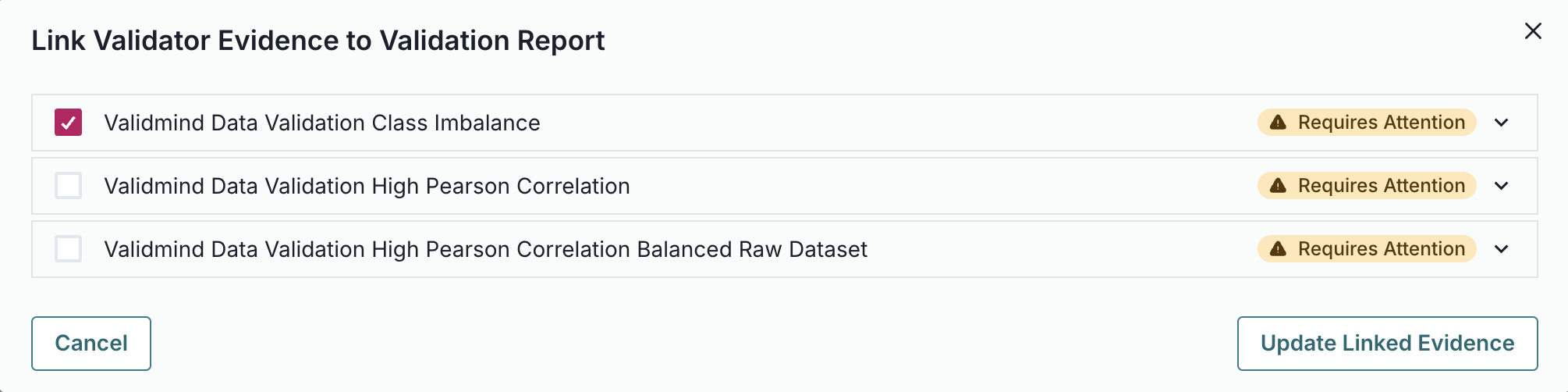
  6. Select the Class Imbalance test results we logged: ValidMind Data Validation Class Imbalance

    Screenshot showing the ClassImbalance test selected

  7. Click Update Linked Evidence to add the test results to the validation report.

  8. Confirm that the results for the Class Imbalance test you inserted has been correctly inserted into section 2.2.1. Data Quality of the report.

    • Note that these test results are flagged as Requires Attention — as they include comparative results from our initial raw dataset.
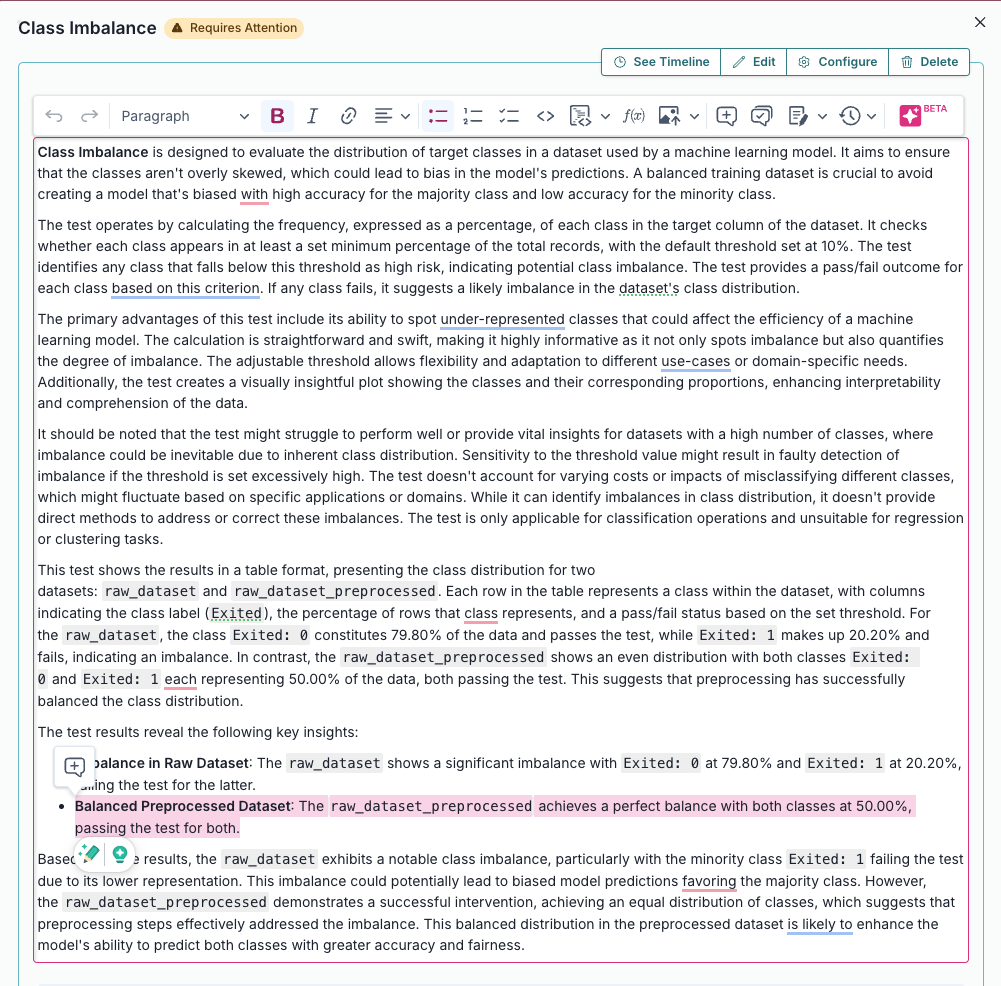
    • Click See evidence details to review the LLM-generated description that summarizes the test results, that confirm that our final preprocessed dataset actually passes our test:

    Screenshot showing the ClassImbalance test generated description in the text editor

Here in this text editor, you can make qualitative edits to the draft that ValidMind generated to finalize the test results.

Learn more: Work with content blocks

Preparing the preprocessed dataset

Split the preprocessed dataset

With our raw dataset rebalanced with highly correlated features removed, let's now spilt our dataset into train and test in preparation for model evaluation testing.

To start, let's grab the first few rows from the balanced_raw_no_age_df dataset we initialized earlier:

balanced_raw_no_age_df.head()
CreditScore Geography Gender Tenure Balance NumOfProducts HasCrCard IsActiveMember EstimatedSalary Exited
1387 717 France Male 7 97459.06 1 0 0 189175.71 0
1489 731 France Male 4 0.00 2 1 1 74945.11 0
6041 701 Spain Female 2 0.00 2 1 0 115650.63 0
5370 619 France Female 0 0.00 3 0 0 60810.64 1
2121 598 France Female 9 0.00 1 0 1 13181.37 1

Before training the model, we need to encode the categorical features in the dataset:

  • Use the OneHotEncoder class from the sklearn.preprocessing module to encode the categorical features.
  • The categorical features in the dataset are Geography and Gender.
balanced_raw_no_age_df = pd.get_dummies(
    balanced_raw_no_age_df, columns=["Geography", "Gender"], drop_first=True
)
balanced_raw_no_age_df.head()
CreditScore Tenure Balance NumOfProducts HasCrCard IsActiveMember EstimatedSalary Exited Geography_Germany Geography_Spain Gender_Male
1387 717 7 97459.06 1 0 0 189175.71 0 False False True
1489 731 4 0.00 2 1 1 74945.11 0 False False True
6041 701 2 0.00 2 1 0 115650.63 0 False True False
5370 619 0 0.00 3 0 0 60810.64 1 False False False
2121 598 9 0.00 1 0 1 13181.37 1 False False False

Splitting our dataset into training and testing is essential for proper validation testing, as this helps assess how well the model generalizes to unseen data:

  • We start by dividing our balanced_raw_no_age_df dataset into training and test subsets using train_test_split, with 80% of the data allocated to training (train_df) and 20% to testing (test_df).
  • From each subset, we separate the features (all columns except "Exited") into X_train and X_test, and the target column ("Exited") into y_train and y_test.
from sklearn.model_selection import train_test_split

train_df, test_df = train_test_split(balanced_raw_no_age_df, test_size=0.20)

X_train = train_df.drop("Exited", axis=1)
y_train = train_df["Exited"]
X_test = test_df.drop("Exited", axis=1)
y_test = test_df["Exited"]

Initialize the split datasets

Next, let's initialize the training and testing datasets so they are available for use:

vm_train_ds = vm.init_dataset(
    input_id="train_dataset_final",
    dataset=train_df,
    target_column="Exited",
)

vm_test_ds = vm.init_dataset(
    input_id="test_dataset_final",
    dataset=test_df,
    target_column="Exited",
)

In summary

In this second notebook, you learned how to:

Next steps

Develop potential challenger models

Now that you're familiar with the basics of using the ValidMind Library, let's use it to develop a challenger model: 3 — Developing a potential challenger


Copyright © 2023-2026 ValidMind Inc. All rights reserved.
Refer to LICENSE for details.
SPDX-License-Identifier: AGPL-3.0 AND ValidMind Commercial