ValidMind for validation 4 — Finalize testing and reporting
Learn how to use ValidMind for your end-to-end validation process with our series of four introductory notebooks. In this last notebook, finalize the compliance assessment process and have a complete validation report ready for review.
This notebook will walk you through how to supplement ValidMind tests with your own custom tests and include them as additional evidence in your validation report. A custom test is any function that takes a set of inputs and parameters as arguments and returns one or more outputs:
The function can be as simple or as complex as you need it to be — it can use external libraries, make API calls, or do anything else that you can do in Python.
The only requirement is that the function signature and return values can be "understood" and handled by the ValidMind Library. As such, custom tests offer added flexibility by extending the default tests provided by ValidMind, enabling you to document any type of record (model) or use case.
For a more in-depth introduction to custom tests, refer to our Implement custom tests notebook.
Learn by doing
Our course tailor-made for validators new to ValidMind combines this series of notebooks with more a more in-depth introduction to the ValidMind Platform — Validator Fundamentals
Prerequisites
In order to finalize validation and reporting, you'll need to first have:
Need help with the above steps?
Refer to the first three notebooks in this series:
# Make sure the ValidMind Library is installed%pip install -q validmind# Load your model identifier credentials from an `.env` file%load_ext dotenv%dotenv .env# Or replace with your code snippetimport validmind as vmvm.init(# api_host="...",# api_key="...",# api_secret="...",# model="...", document="validation-report",)
Note: you may need to restart the kernel to use updated packages.
2026-10-02 20:41:55,755 - INFO(validmind.api_client): 🎉 Connected to ValidMind!
📊 Model: [ValidMind Academy] Model validation (ID: cmalguc9y02ok199q2db381ib)
📁 Document Type: validation_report
Import the sample dataset
Next, we'll load in the same sample Bank Customer Churn Prediction dataset used to develop the champion that we will independently preprocess:
# Load the sample datasetfrom validmind.datasets.classification import customer_churn as demo_datasetprint(f"Loaded demo dataset with: \n\n\t• Target column: '{demo_dataset.target_column}' \n\t• Class labels: {demo_dataset.class_labels}")raw_df = demo_dataset.load_data()
Loaded demo dataset with:

    • Target column: 'Exited'
    • Class labels: {'0': 'Did not exit', '1': 'Exited'}
# Initialize the raw dataset for use in ValidMind testsvm_raw_dataset = vm.init_dataset( dataset=raw_df, input_id="raw_dataset", target_column="Exited",)
import pandas as pdraw_copy_df = raw_df.sample(frac=1) # Create a copy of the raw dataset# Create a balanced dataset with the same number of exited and not exited customersexited_df = raw_copy_df.loc[raw_copy_df["Exited"] ==1]not_exited_df = raw_copy_df.loc[raw_copy_df["Exited"] ==0].sample(n=exited_df.shape[0])balanced_raw_df = pd.concat([exited_df, not_exited_df])balanced_raw_df = balanced_raw_df.sample(frac=1, random_state=42)
Let’s also quickly remove highly correlated features from the dataset using the output from a ValidMind test:
# Register new data and now 'balanced_raw_dataset' is the new dataset object of interestvm_balanced_raw_dataset = vm.init_dataset( dataset=balanced_raw_df, input_id="balanced_raw_dataset", target_column="Exited",)
# Run HighPearsonCorrelation test with our balanced dataset as input and return a result objectcorr_result = vm.tests.run_test( test_id="validmind.data_validation.HighPearsonCorrelation", params={"max_threshold": 0.3}, inputs={"dataset": vm_balanced_raw_dataset},)
❌ High Pearson Correlation
The High Pearson Correlation test evaluates pairwise linear relationships among features to identify potentially redundant or highly collinear variable pairs. The result table reports the top feature pairs ranked by Pearson correlation coefficient, along with a Pass/Fail assessment against the configured absolute threshold of 0.3. In this output, coefficients range from -0.1733 to 0.3585, and only one pair exceeds the threshold. The remaining listed pairs are all below the threshold and are recorded as passing.
Key insights:
One pair exceeds threshold: The pair (Age, Exited) has a Pearson correlation coefficient of 0.3585, which is above the 0.3 threshold and is the only relationship in the reported output marked Fail.
All other reported pairs pass: The other nine listed feature pairs have absolute correlation values below 0.1733, remaining well under the threshold and marked Pass.
Reported relationships are generally weak: Aside from (Age, Exited), the magnitudes of the reported coefficients are small, including values such as -0.1733 for (IsActiveMember, Exited), -0.1667 for (Balance, NumOfProducts), and 0.1284 for (Balance, Exited).
Both positive and negative associations appear: The reported coefficients include both positive and negative values, with the strongest positive association observed for (Age, Exited) at 0.3585 and the strongest negative association observed for (IsActiveMember, Exited) at -0.1733.
The reported correlation structure is dominated by low-magnitude pairwise linear relationships, with a single exception. Among the top correlations returned by the test, only (Age, Exited) exceeds the configured threshold, while all remaining reported pairs stay below it by a clear margin. This indicates that the test output identifies one materially stronger linear association relative to the threshold and otherwise limited pairwise linear dependence among the listed variables.
Parameters:
{
  "max_threshold": 0.3
}
Tables
Columns
Coefficient
Pass/Fail
(Age, Exited)
0.3585
Fail
(IsActiveMember, Exited)
-0.1733
Pass
(Balance, NumOfProducts)
-0.1667
Pass
(Balance, Exited)
0.1284
Pass
(NumOfProducts, Exited)
-0.0540
Pass
(Age, NumOfProducts)
-0.0463
Pass
(Tenure, IsActiveMember)
-0.0441
Pass
(CreditScore, EstimatedSalary)
-0.0367
Pass
(NumOfProducts, IsActiveMember)
0.0363
Pass
(CreditScore, Age)
-0.0355
Pass
# From result object, extract table from `corr_result.tables`features_df = corr_result.tables[0].datafeatures_df
Columns
Coefficient
Pass/Fail
0
(Age, Exited)
0.3585
Fail
1
(IsActiveMember, Exited)
-0.1733
Pass
2
(Balance, NumOfProducts)
-0.1667
Pass
3
(Balance, Exited)
0.1284
Pass
4
(NumOfProducts, Exited)
-0.0540
Pass
5
(Age, NumOfProducts)
-0.0463
Pass
6
(Tenure, IsActiveMember)
-0.0441
Pass
7
(CreditScore, EstimatedSalary)
-0.0367
Pass
8
(NumOfProducts, IsActiveMember)
0.0363
Pass
9
(CreditScore, Age)
-0.0355
Pass
# Extract list of features that failed the testhigh_correlation_features = features_df[features_df["Pass/Fail"] =="Fail"]["Columns"].tolist()high_correlation_features
['(Age, Exited)']
# Extract feature names from the list of stringshigh_correlation_features = [feature.split(",")[0].strip("()") for feature in high_correlation_features]high_correlation_features
['Age']
# Remove the highly correlated features from the datasetbalanced_raw_no_age_df = balanced_raw_df.drop(columns=high_correlation_features)# Re-initialize the dataset objectvm_raw_dataset_preprocessed = vm.init_dataset( dataset=balanced_raw_no_age_df, input_id="raw_dataset_preprocessed", target_column="Exited",)
# Re-run the test with the reduced feature setcorr_result = vm.tests.run_test( test_id="validmind.data_validation.HighPearsonCorrelation", params={"max_threshold": 0.3}, inputs={"dataset": vm_raw_dataset_preprocessed},)
✅ High Pearson Correlation
The High Pearson Correlation test evaluates pairwise linear relationships between features to identify potentially redundant variables or multicollinearity. The results table lists the top 10 strongest feature-pair correlations by absolute value, along with each pair’s Pearson coefficient and pass/fail status under the configured threshold of 0.3. In this run, all reported coefficients are below the threshold and all pairs are marked as Pass. The observed coefficients range from -0.1733 to 0.1284, indicating generally weak linear relationships among the reported feature pairs.
Key insights:
No threshold breaches observed: All 10 reported feature pairs are marked Pass under the 0.3 threshold, with no absolute correlation coefficient exceeding the configured limit.
Strongest relationship remains weak: The largest absolute correlation is between IsActiveMember and Exited at -0.1733, which remains well below the test threshold.
Top correlations are concentrated near zero: The reported coefficients span a narrow range from -0.1733 to 0.1284, with most values clustered close to zero, including several below 0.05 in magnitude.
Both positive and negative associations appear limited: The highest positive coefficient is 0.1284 for Balance and Exited, while the most negative is -0.1733 for IsActiveMember and Exited; neither indicates a strong linear relationship.
The reported correlation structure shows no high pairwise linear dependencies under the test configuration. Across the top 10 strongest feature pairs, coefficient magnitudes remain low and all results pass the 0.3 threshold. Taken together, the results indicate limited evidence of feature redundancy based on pairwise Pearson correlation in the reported relationships.
Parameters:
{
  "max_threshold": 0.3
}
Tables
Columns
Coefficient
Pass/Fail
(IsActiveMember, Exited)
-0.1733
Pass
(Balance, NumOfProducts)
-0.1667
Pass
(Balance, Exited)
0.1284
Pass
(NumOfProducts, Exited)
-0.0540
Pass
(Tenure, IsActiveMember)
-0.0441
Pass
(CreditScore, EstimatedSalary)
-0.0367
Pass
(NumOfProducts, IsActiveMember)
0.0363
Pass
(Balance, HasCrCard)
-0.0345
Pass
(CreditScore, Exited)
-0.0340
Pass
(HasCrCard, IsActiveMember)
-0.0325
Pass
Split the preprocessed dataset
With our raw dataset rebalanced with highly correlated features removed, let's now spilt our dataset into train and test in preparation for model evaluation testing:
# Encode categorical features in the datasetbalanced_raw_no_age_df = pd.get_dummies( balanced_raw_no_age_df, columns=["Geography", "Gender"], drop_first=True)balanced_raw_no_age_df.head()
CreditScore
Tenure
Balance
NumOfProducts
HasCrCard
IsActiveMember
EstimatedSalary
Exited
Geography_Germany
Geography_Spain
Gender_Male
3804
711
8
0.00
2
1
0
55207.41
0
False
True
True
4691
699
2
117468.67
1
1
0
185227.42
0
False
False
True
2609
678
1
0.00
2
0
1
130446.65
0
False
False
False
105
432
9
152603.45
1
1
0
110265.24
1
False
False
True
5926
570
1
127201.58
1
1
0
147168.28
1
True
False
True
from sklearn.model_selection import train_test_split# Split the dataset into train and testtrain_df, test_df = train_test_split(balanced_raw_no_age_df, test_size=0.20)X_train = train_df.drop("Exited", axis=1)y_train = train_df["Exited"]X_test = test_df.drop("Exited", axis=1)y_test = test_df["Exited"]
With our raw dataset assessed and preprocessed, let's go ahead and import the champion submitted by the development team in the format of a .pkl file: lr_model_champion.pkl
# Import the champion modelimport pickle as pklwithopen("lr_model_champion.pkl", "rb") as f: log_reg = pkl.load(f)
/opt/hostedtoolcache/Python/3.11.16/x64/lib/python3.11/site-packages/sklearn/base.py:442: InconsistentVersionWarning: Trying to unpickle estimator LogisticRegression from version 1.3.2 when using version 1.7.2. This might lead to breaking code or invalid results. Use at your own risk. For more info please refer to:
https://scikit-learn.org/stable/model_persistence.html#security-maintainability-limitations
  warnings.warn(
Train potential challenger model
We'll also train our random forest classification challenger to see how it compares:
# Import the Random Forest Classification modelfrom sklearn.ensemble import RandomForestClassifier# Create the model instance with 50 decision treesrf_model = RandomForestClassifier( n_estimators=50, random_state=42,)# Train the modelrf_model.fit(X_train, y_train)
In a Jupyter environment, please rerun this cell to show the HTML representation or trust the notebook. On GitHub, the HTML representation is unable to render, please try loading this page with nbviewer.org.
Parameters
n_estimators
50
criterion
'gini'
max_depth
None
min_samples_split
2
min_samples_leaf
1
min_weight_fraction_leaf
0.0
max_features
'sqrt'
max_leaf_nodes
None
min_impurity_decrease
0.0
bootstrap
True
oob_score
False
n_jobs
None
random_state
42
verbose
0
warm_start
False
class_weight
None
ccp_alpha
0.0
max_samples
None
monotonic_cst
None
Initialize the ValidMind models
In addition to the initialized datasets, you'll also need to initialize a ValidMind model object (vm_model) that can be passed to other functions for analysis and tests on the data for each of our two models:
# Initialize the champion logistic regression modelvm_log_model = vm.init_model( log_reg, input_id="log_model_champion",)# Initialize the challenger random forest classification modelvm_rf_model = vm.init_model( rf_model, input_id="rf_model",)
# Assign predictions to Champion — Logistic regression modelvm_train_ds.assign_predictions(model=vm_log_model)vm_test_ds.assign_predictions(model=vm_log_model)# Assign predictions to Challenger — Random forest classification modelvm_train_ds.assign_predictions(model=vm_rf_model)vm_test_ds.assign_predictions(model=vm_rf_model)
2026-10-02 20:42:10,922 - INFO(validmind.vm_models.dataset.utils): Running predict_proba()... This may take a while
2026-10-02 20:42:10,924 - INFO(validmind.vm_models.dataset.utils): Done running predict_proba()
2026-10-02 20:42:10,924 - INFO(validmind.vm_models.dataset.utils): Running predict()... This may take a while
2026-10-02 20:42:10,925 - INFO(validmind.vm_models.dataset.utils): Done running predict()
2026-10-02 20:42:10,927 - INFO(validmind.vm_models.dataset.utils): Running predict_proba()... This may take a while
2026-10-02 20:42:10,927 - INFO(validmind.vm_models.dataset.utils): Done running predict_proba()
2026-10-02 20:42:10,928 - INFO(validmind.vm_models.dataset.utils): Running predict()... This may take a while
2026-10-02 20:42:10,929 - INFO(validmind.vm_models.dataset.utils): Done running predict()
2026-10-02 20:42:10,930 - INFO(validmind.vm_models.dataset.utils): Running predict_proba()... This may take a while
2026-10-02 20:42:10,943 - INFO(validmind.vm_models.dataset.utils): Done running predict_proba()
2026-10-02 20:42:10,943 - INFO(validmind.vm_models.dataset.utils): Running predict()... This may take a while
2026-10-02 20:42:10,956 - INFO(validmind.vm_models.dataset.utils): Done running predict()
2026-10-02 20:42:10,958 - INFO(validmind.vm_models.dataset.utils): Running predict_proba()... This may take a while
2026-10-02 20:42:10,963 - INFO(validmind.vm_models.dataset.utils): Done running predict_proba()
2026-10-02 20:42:10,963 - INFO(validmind.vm_models.dataset.utils): Running predict()... This may take a while
2026-10-02 20:42:10,969 - INFO(validmind.vm_models.dataset.utils): Done running predict()
Implementing custom tests
Thanks to the documentation (Learn more:ValidMind for development), we know that the development team implemented a custom test to further evaluate the performance of the champion.
In a usual validation situation, you would load a saved custom test provided by the development team. In the following section, we'll have you implement the same custom test and make it available for reuse, to familiarize you with the processes.
Let's implement the same custom inline test that calculates the confusion matrix for a binary classification model that the development team used in their performance evaluations.
An inline test refers to a test written and executed within the same environment as the code being tested — in this case, right in this Jupyter Notebook — without requiring a separate test file or framework.
You'll note that the custom test function is just a regular Python function that can include and require any Python library as you see fit.
Create a confusion matrix plot
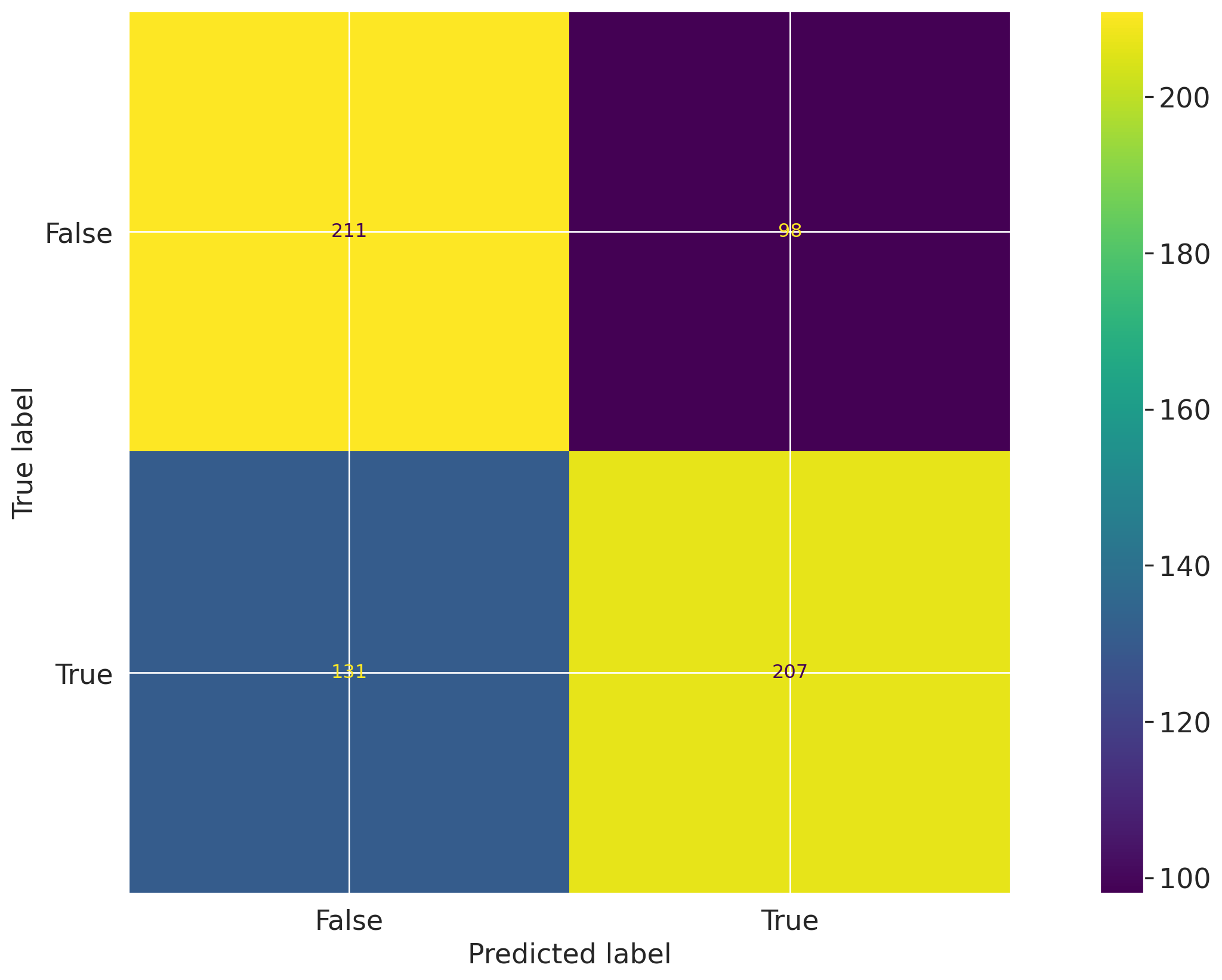
Let's first create a confusion matrix plot using the confusion_matrix function from the sklearn.metrics module:
import matplotlib.pyplot as pltfrom sklearn import metrics# Get the predicted classesy_pred = log_reg.predict(vm_test_ds.x)confusion_matrix = metrics.confusion_matrix(y_test, y_pred)cm_display = metrics.ConfusionMatrixDisplay( confusion_matrix=confusion_matrix, display_labels=[False, True])cm_display.plot()
Next, create a @vm.test wrapper that will allow you to create a reusable test. Note the following changes in the code below:
The function confusion_matrix takes two arguments dataset and model. This is a VMDataset and VMModel object respectively.
VMDataset objects allow you to access the dataset's true (target) values by accessing the .y attribute.
VMDataset objects allow you to access the predictions for a given record (model) by accessing the .y_pred() method.
The function docstring provides a description of what the test does. This will be displayed along with the result in this notebook as well as in the ValidMind Platform.
The function body calculates the confusion matrix using the sklearn.metrics.confusion_matrix function as we just did above.
The function then returns the ConfusionMatrixDisplay.figure_ object — this is important as the ValidMind Library expects the output of the custom test to be a plot or a table.
The @vm.test decorator is doing the work of creating a wrapper around the function that will allow it to be run by the ValidMind Library. It also registers the test so it can be found by the ID my_custom_tests.ConfusionMatrix.
@vm.test("my_custom_tests.ConfusionMatrix")def confusion_matrix(dataset, model):"""The confusion matrix is a table that is often used to describe the performance of a classification model on a set of data for which the true values are known. The confusion matrix is a 2x2 table that contains 4 values: - True Positive (TP): the number of correct positive predictions - True Negative (TN): the number of correct negative predictions - False Positive (FP): the number of incorrect positive predictions - False Negative (FN): the number of incorrect negative predictions The confusion matrix can be used to assess the holistic performance of a classification model by showing the accuracy, precision, recall, and F1 score of the model on a single figure. """ y_true = dataset.y y_pred = dataset.y_pred(model=model) confusion_matrix = metrics.confusion_matrix(y_true, y_pred) cm_display = metrics.ConfusionMatrixDisplay( confusion_matrix=confusion_matrix, display_labels=[False, True] ) cm_display.plot() plt.close() # close the plot to avoid displaying itreturn cm_display.figure_ # return the figure object itself
You can now run the newly created custom test on both the training and test datasets for both models using the run_test() function:
The Confusion Matrix test evaluates classification performance by comparing predicted labels with true labels across the training and test datasets. The results are shown as 2x2 matrices with counts for true negatives, false positives, false negatives, and true positives. For the training dataset, the matrix contains 833 true negatives, 464 false positives, 475 false negatives, and 813 true positives. For the test dataset, the matrix contains 198 true negatives, 121 false positives, 132 false negatives, and 196 true positives.
Key insights:
Correct classifications exceed errors: In the training dataset, correct predictions total 1,646 (833 true negatives and 813 true positives) versus 939 misclassifications (464 false positives and 475 false negatives). In the test dataset, correct predictions total 394 (198 true negatives and 196 true positives) versus 253 misclassifications (121 false positives and 132 false negatives).
Error types are balanced: Misclassification counts are close across error types in both datasets. Training results show 464 false positives and 475 false negatives, while test results show 121 false positives and 132 false negatives.
Prediction performance is symmetric across classes: Correct classification counts are similar between the negative and positive classes in both datasets. Training results show 833 true negatives versus 813 true positives, and test results show 198 true negatives versus 196 true positives.
The confusion matrices indicate that the model produces more correct classifications than misclassifications on both the training and test datasets. Performance is balanced across positive and negative classes, with similar counts of true negatives and true positives, and the distribution of false positives and false negatives remains closely aligned across both datasets. Overall, the observed classification pattern is consistent between the two samples at the level of confusion matrix counts.
Figures
2026-10-02 20:42:17,957 - INFO(validmind.vm_models.result.result): Test driven block with result_id my_custom_tests.ConfusionMatrix:champion does not exist in model's document
The Confusion Matrix test evaluates classification outcomes by comparing predicted labels against true labels and summarizing the counts of true positives, true negatives, false positives, and false negatives. The results are shown separately for the training dataset and the test dataset. For the training dataset, the matrix contains 1,296 true negatives, 1 false positive, 1 false negative, and 1,287 true positives. For the test dataset, the matrix contains 229 true negatives, 90 false positives, 107 false negatives, and 221 true positives.
Key insights:
Near-perfect training classification: On the training dataset, only 2 observations are misclassified in total, with 1 false positive and 1 false negative, compared with 2,583 correct classifications.
Test performance declines materially: On the test dataset, misclassifications increase to 197 observations, consisting of 90 false positives and 107 false negatives, versus 450 correct classifications.
Errors are balanced on training data: Training errors are evenly split between the two error types, with 1 false positive and 1 false negative.
False negatives slightly exceed false positives on test data: On the test dataset, false negatives (107) are modestly higher than false positives (90), indicating somewhat more missed positive cases than incorrect positive assignments.
Class outcomes are relatively balanced in both samples: The training matrix shows similar counts for negatives and positives (1,297 vs. 1,288 actual observations), and the test matrix also remains comparatively balanced (319 negatives vs. 328 positives).
The confusion matrices show a pronounced difference between training and test classification results. Training outcomes are almost entirely concentrated on the diagonal, while the test dataset exhibits a substantially larger number of both false positives and false negatives. Error types on the test dataset are of similar magnitude, with false negatives slightly higher, and the observed class counts are relatively balanced across both datasets.
Figures
2026-10-02 20:42:25,841 - INFO(validmind.vm_models.result.result): Test driven block with result_id my_custom_tests.ConfusionMatrix:challenger does not exist in model's document
Note the output returned indicating that a test-driven block doesn't currently exist in your documentation for some test IDs.
That's expected, as when we run validations tests the results logged need to be manually added to your report as part of your compliance assessment process within the ValidMind Platform.
Add parameters to custom tests
Custom tests can take parameters just like any other function. To demonstrate, let's modify the confusion_matrix function to take an additional parameter normalize that will allow you to normalize the confusion matrix:
@vm.test("my_custom_tests.ConfusionMatrix")def confusion_matrix(dataset, model, normalize=False):"""The confusion matrix is a table that is often used to describe the performance of a classification model on a set of data for which the true values are known. The confusion matrix is a 2x2 table that contains 4 values: - True Positive (TP): the number of correct positive predictions - True Negative (TN): the number of correct negative predictions - False Positive (FP): the number of incorrect positive predictions - False Negative (FN): the number of incorrect negative predictions The confusion matrix can be used to assess the holistic performance of a classification model by showing the accuracy, precision, recall, and F1 score of the model on a single figure. """ y_true = dataset.y y_pred = dataset.y_pred(model=model)if normalize: confusion_matrix = metrics.confusion_matrix(y_true, y_pred, normalize="all")else: confusion_matrix = metrics.confusion_matrix(y_true, y_pred) cm_display = metrics.ConfusionMatrixDisplay( confusion_matrix=confusion_matrix, display_labels=[False, True] ) cm_display.plot() plt.close() # close the plot to avoid displaying itreturn cm_display.figure_ # return the figure object itself
Pass parameters to custom tests
You can pass parameters to custom tests by providing a dictionary of parameters to the run_test() function.
The parameters will override any default parameters set in the custom test definition. Note that dataset and model are still passed as inputs.
Since these are VMDataset or VMModel inputs, they have a special meaning.
Re-running and logging the custom confusion matrix with normalize=True for both models and our testing dataset looks like this:
# Champion with test dataset and normalize=Truevm.tests.run_test( test_id="my_custom_tests.ConfusionMatrix:test_normalized_champion", input_grid={"dataset": [vm_test_ds],"model" : [vm_log_model] }, params={"normalize": True}).log()
Confusion Matrix Test Normalized Champion
The Confusion Matrix test evaluates classification outcomes by comparing predicted labels with true labels, and this result presents a normalized confusion matrix for log_model_champion on test_dataset_final. The matrix shows the proportion of observations in each outcome category rather than raw counts. The displayed cells are 0.31 for true negatives, 0.19 for false positives, 0.20 for false negatives, and 0.30 for true positives, with true labels on the y-axis and predicted labels on the x-axis.
Key insights:
Correct classifications slightly exceed errors: The diagonal cells sum to 0.61 (0.31 true negatives and 0.30 true positives), while the off-diagonal cells sum to 0.39 (0.19 false positives and 0.20 false negatives).
Balanced correct classification across classes: True negatives and true positives are nearly equal at 0.31 and 0.30, indicating similar normalized shares of correct predictions for the negative and positive classes.
Error types are also closely balanced: False positives are 0.19 and false negatives are 0.20, showing little difference between the two misclassification categories.
No dominant cell in the matrix: All four normalized values fall within a relatively narrow range from 0.19 to 0.31, indicating that prediction outcomes are distributed across both correct and incorrect classifications rather than concentrated in a single category.
The normalized confusion matrix indicates that correct classifications account for a larger share of outcomes than misclassifications, with 0.61 of observations on the diagonal. Correct predictions are distributed almost evenly between negative and positive classes, and the two error types are similarly sized. Overall, the result reflects a broadly balanced classification pattern across the four confusion matrix cells.
Parameters:
{
  "normalize": true
}
Figures
2026-10-02 20:42:33,574 - INFO(validmind.vm_models.result.result): Test driven block with result_id my_custom_tests.ConfusionMatrix:test_normalized_champion does not exist in model's document
# Challenger with test dataset and normalize=Truevm.tests.run_test( test_id="my_custom_tests.ConfusionMatrix:test_normalized_challenger", input_grid={"dataset": [vm_test_ds],"model" : [vm_rf_model] }, params={"normalize": True}).log()
Confusion Matrix Test Normalized Challenger
The ConfusionMatrix test evaluates classification outcomes by comparing predicted labels against true labels, and this normalized result shows how observations are distributed across true negatives, false positives, false negatives, and true positives. The matrix is presented for dataset=test_dataset_final and model=rf_model, with normalization enabled. The four cells show values of 0.35 for true negatives, 0.14 for false positives, 0.17 for false negatives, and 0.34 for true positives.
Key insights:
Correct classifications dominate the matrix: The diagonal cells account for 0.35 true negatives and 0.34 true positives, for a combined normalized share of 0.69. This indicates that most observations fall into correctly classified outcomes.
Error mass is relatively balanced: Off-diagonal values are 0.14 for false positives and 0.17 for false negatives. The difference between the two error types is 0.03, showing similar contribution from each misclassification category.
Negative and positive predictions perform similarly: The two correct classification cells are nearly equal at 0.35 and 0.34. This indicates comparable normalized capture of the negative and positive classes in the correctly classified portion of the sample.
The normalized confusion matrix shows that the largest shares of observations are concentrated in the true negative and true positive cells, while smaller shares appear in the false positive and false negative cells. Misclassifications are present on both sides of the matrix and are of similar magnitude, with false negatives slightly higher than false positives. Overall, the result reflects a broadly even distribution between correct classification of the two classes with moderate but balanced classification error.
Parameters:
{
  "normalize": true
}
Figures
2026-10-02 20:42:41,262 - INFO(validmind.vm_models.result.result): Test driven block with result_id my_custom_tests.ConfusionMatrix:test_normalized_challenger does not exist in model's document
Use external test providers
Sometimes you may want to reuse the same set of custom tests across multiple records (models) and share them with others in your organization, like the development team would have done with you in this example workflow featured in this series of notebooks. In this case, you can create an external custom test provider that will allow you to load custom tests from a local folder or a Git repository.
In this section you will learn how to declare a local filesystem test provider that allows loading tests from a local folder following these high level steps:
Create a folder of custom tests from existing inline tests (tests that exist in your active Jupyter Notebook)
Let's start by creating a new folder that will contain reusable custom tests from your existing inline tests.
The following code snippet will create a new my_tests directory in the current working directory if it doesn't exist:
tests_folder ="my_tests"import os# create tests folderos.makedirs(tests_folder, exist_ok=True)# remove existing testsfor f in os.listdir(tests_folder):# remove files and pycacheif f.endswith(".py") or f =="__pycache__": os.system(f"rm -rf {tests_folder}/{f}")
After running the command above, confirm that a new my_tests directory was created successfully. For example:
~/notebooks/tutorials/validation/my_tests/
Save an inline test
The @vm.test decorator we used in Implement a custom inline test above to register one-off custom tests also includes a convenience method on the function object that allows you to simply call <func_name>.save() to save the test to a Python file at a specified path.
While save() will get you started by creating the file and saving the function code with the correct name, it won't automatically include any imports, or other functions or variables, outside of the functions that are needed for the test to run. To solve this, pass in an optional imports argument ensuring necessary imports are added to the file.
The confusion_matrix test requires the following additional imports:
import matplotlib.pyplot as pltfrom sklearn import metrics
Let's pass these imports to the save() method to ensure they are included in the file with the following command:
confusion_matrix.save(# Save it to the custom tests folder we created tests_folder, imports=["import matplotlib.pyplot as plt", "from sklearn import metrics"],)
2026-10-02 20:42:41,698 - INFO(validmind.tests.decorator): Saved to /home/runner/work/documentation/documentation/site/notebooks/EXECUTED/validation/my_tests/ConfusionMatrix.py!Be sure to add any necessary imports to the top of the file.
2026-10-02 20:42:41,698 - INFO(validmind.tests.decorator): This metric can be run with the ID: <test_provider_namespace>.ConfusionMatrix
# Saved from __main__.confusion_matrix
# Original Test ID: my_custom_tests.ConfusionMatrix
# New Test ID: <test_provider_namespace>.ConfusionMatrix
Now that your my_tests folder has a sample custom test, let's initialize a test provider that will tell the ValidMind Library where to find your custom tests:
ValidMind offers out-of-the-box test providers for local tests (tests in a folder) or a Github provider for tests in a Github repository.
You can also create your own test provider by creating a class that has a load_test method that takes a test ID and returns the test function matching that ID.
For most use cases, using a LocalTestProvider that allows you to load custom tests from a designated directory should be sufficient.
The most important attribute for a test provider is its namespace. This is a string that will be used to prefix test IDs in documentation. This allows you to have multiple test providers with tests that can even share the same ID, but are distinguished by their namespace.
Let's go ahead and load the custom tests from our my_tests directory:
from validmind.tests import LocalTestProvider# initialize the test provider with the tests folder we created earliermy_test_provider = LocalTestProvider(tests_folder)vm.tests.register_test_provider( namespace="my_test_provider", test_provider=my_test_provider,)# `my_test_provider.load_test()` will be called for any test ID that starts with `my_test_provider`# e.g. `my_test_provider.ConfusionMatrix` will look for a function named `ConfusionMatrix` in `my_tests/ConfusionMatrix.py` file
Run test provider tests
Now that we've set up the test provider, we can run any test that's located in the tests folder by using the run_test() method as with any other test:
For tests that reside in a test provider directory, the test ID will be the namespace specified when registering the provider, followed by the path to the test file relative to the tests folder.
For example, the Confusion Matrix test we created earlier will have the test ID my_test_provider.ConfusionMatrix. You could organize the tests in subfolders, say classification and regression, and the test ID for the Confusion Matrix test would then be my_test_provider.classification.ConfusionMatrix.
Let's go ahead and re-run the confusion matrix test with our testing dataset for our two models by using the test ID my_test_provider.ConfusionMatrix. This should load the test from the test provider and run it as before.
# Champion with test dataset and test provider custom testvm.tests.run_test( test_id="my_test_provider.ConfusionMatrix:champion", input_grid={"dataset": [vm_test_ds],"model" : [vm_log_model] }).log()
Confusion Matrix Champion
The Confusion Matrix test evaluates classification outcomes by comparing predicted labels with observed labels. The result for test_dataset_final and log_model_champion is presented as a 2x2 matrix with counts for true negatives, false positives, false negatives, and true positives. The matrix shows 198 observations with true label False correctly predicted as False, 121 False observations predicted as True, 132 True observations predicted as False, and 196 True observations correctly predicted as True.
Key insights:
Correct classifications exceed errors: The model records 394 correct predictions in total, comprising 198 true negatives and 196 true positives, versus 253 misclassifications across false positives and false negatives.
Class-level correct predictions are balanced: Correct predictions are nearly evenly split between the two classes, with 198 correctly identified False cases and 196 correctly identified True cases.
False negatives slightly exceed false positives: The model produces 132 false negatives compared with 121 false positives, indicating somewhat more missed True cases than incorrect True assignments.
Observed class counts are similar: The test set contains 319 observations with true label False and 328 observations with true label True, showing a closely balanced distribution of the two observed classes.
The confusion matrix indicates that the model achieves similar numbers of correct predictions for both classes while maintaining more correct classifications than errors overall. Misclassification is present in both directions, with false negatives occurring slightly more often than false positives. The observed test sample is also balanced across true False and true True labels, which supports direct comparison of class-level outcomes within this result.
Figures
2026-10-02 20:42:47,842 - INFO(validmind.vm_models.result.result): Test driven block with result_id my_test_provider.ConfusionMatrix:champion does not exist in model's document
# Challenger with test dataset and test provider custom testvm.tests.run_test( test_id="my_test_provider.ConfusionMatrix:challenger", input_grid={"dataset": [vm_test_ds],"model" : [vm_rf_model] }).log()
Confusion Matrix Challenger
The Confusion Matrix test evaluates classification performance by comparing predicted labels with true labels across the test dataset. The matrix shows counts for true negatives, false positives, false negatives, and true positives in a 2x2 layout. In this result, the largest counts appear in the correctly classified cells, with 229 observations in the true negative cell and 221 in the true positive cell, while the misclassified cells contain 90 false positives and 107 false negatives.
Key insights:
Correct classifications dominate: The diagonal cells contain 229 true negatives and 221 true positives, exceeding the off-diagonal counts of 90 false positives and 107 false negatives.
False negatives exceed false positives: The model records 107 false negatives versus 90 false positives, indicating more missed positive cases than incorrect positive assignments.
Negative class is classified slightly better: Among actual negative cases, 229 are correctly classified and 90 are misclassified, while among actual positive cases, 221 are correctly classified and 107 are misclassified.
Error distribution is relatively balanced: Misclassifications are present in both directions, with a difference of 17 cases between false negatives and false positives rather than a highly one-sided error pattern.
The confusion matrix indicates that the model correctly classifies more observations than it misclassifies in both classes, with strong concentration in the diagonal cells. Errors are distributed across both false positive and false negative outcomes, though false negatives occur somewhat more frequently. Overall, the observed performance reflects a reasonably balanced classification pattern with slightly stronger results on the negative class.
Figures
2026-10-02 20:42:54,819 - INFO(validmind.vm_models.result.result): Test driven block with result_id my_test_provider.ConfusionMatrix:challenger does not exist in model's document
Verify test runs
Our final task is to verify that all the tests provided by the development team were run and reported accurately. Note the appended result_ids to delineate which dataset we ran the test with for the relevant tests.
Here, we'll specify all the tests we'd like to independently rerun in a dictionary called test_config. Note here that inputs and input_grid expect the input_id of the dataset or model as the value rather than the variable name we specified:
for t in test_config:print(t)try:# Check if test has input_gridif'input_grid'in test_config[t]:# For tests with input_grid, pass the input_grid configurationif'params'in test_config[t]: vm.tests.run_test(t, input_grid=test_config[t]['input_grid'], params=test_config[t]['params']).log()else: vm.tests.run_test(t, input_grid=test_config[t]['input_grid']).log()else:# Original logic for regular inputsif'params'in test_config[t]: vm.tests.run_test(t, inputs=test_config[t]['inputs'], params=test_config[t]['params']).log()else: vm.tests.run_test(t, inputs=test_config[t]['inputs']).log()exceptExceptionas e:print(f"Error running test {t}: {str(e)}")
The Dataset Description test evaluates the structure, completeness, and cardinality of each column in the raw dataset. The results summarize 11 columns across numeric and categorical types, reporting counts, missingness, and distinct-value levels for each field. All listed variables have 8,000 observed records, with per-column distinct counts ranging from 2 to 8,000. The table therefore provides a column-level view of data completeness and variability for the raw training dataset.
Key insights:
No missing values observed: All 11 columns show 0 missing values and 0.0% missingness across 8,000 records, indicating complete population of the fields included in the dataset description.
EstimatedSalary is fully unique: EstimatedSalary has 8,000 distinct values out of 8,000 records, corresponding to a distinct ratio of 1.0, which is the highest cardinality in the dataset.
Balance also shows high cardinality: Balance contains 5,088 distinct values, representing 63.6% of the dataset, making it the second most granular variable after EstimatedSalary.
Several variables have very low cardinality: Gender, HasCrCard, IsActiveMember, and Exited each contain 2 distinct values, while Geography has 3 and NumOfProducts has 4, indicating multiple fields with small discrete value sets.
Numeric fields vary materially in granularity: Among numeric variables, distinct counts range from 4 for NumOfProducts to 8,000 for EstimatedSalary. Other numeric fields show intermediate variation, including Tenure with 11 distinct values, Age with 69, and CreditScore with 452.
The dataset description indicates complete observed coverage across all documented columns, with no missing values in the raw data. Variable cardinality differs substantially by field, with highly granular numeric variables such as EstimatedSalary and Balance alongside low-cardinality numeric and categorical fields. Overall, the results show a mixed feature set composed of both continuous-like and discrete variables across 8,000 records.
Tables
Dataset Description
Name
Type
Count
Missing
Missing %
Distinct
Distinct %
CreditScore
Numeric
8000.0
0
0.0
452
0.0565
Geography
Categorical
8000.0
0
0.0
3
0.0004
Gender
Categorical
8000.0
0
0.0
2
0.0002
Age
Numeric
8000.0
0
0.0
69
0.0086
Tenure
Numeric
8000.0
0
0.0
11
0.0014
Balance
Numeric
8000.0
0
0.0
5088
0.6360
NumOfProducts
Numeric
8000.0
0
0.0
4
0.0005
HasCrCard
Categorical
8000.0
0
0.0
2
0.0002
IsActiveMember
Categorical
8000.0
0
0.0
2
0.0002
EstimatedSalary
Numeric
8000.0
0
0.0
8000
1.0000
Exited
Categorical
8000.0
0
0.0
2
0.0002
2026-10-02 20:43:02,265 - INFO(validmind.vm_models.result.result): Test driven block with result_id validmind.data_validation.DatasetDescription:raw_data does not exist in model's document
The Descriptive Statistics test evaluates the distributional characteristics of numerical and categorical variables in the raw dataset. The results are presented in separate summary tables for eight numerical variables and two categorical variables, showing counts, central tendency, dispersion, quantiles, and category concentration. All reported variables have a count of 8,000 observations, and the tables highlight differences in spread, percentile structure, and concentration across features such as Balance, EstimatedSalary, Geography, and Gender.
Key insights:
Complete coverage across all variables: Every numerical and categorical variable reports a count of 8,000, indicating that the summary tables were generated on a uniformly populated dataset for the listed fields.
Balance shows pronounced lower-end concentration: Balance has a minimum of 0 and a 25th percentile of 0, while the median is 97,264 and the mean is 76,434.10. This indicates that at least one quarter of observations are at zero, alongside a broad positive range extending to 250,898.
EstimatedSalary is broadly dispersed but centered: EstimatedSalary ranges from 12 to 199,992, with a mean of 99,790.19 and a median of 99,505. The proximity of mean and median indicates a centered distribution despite a wide spread, with a standard deviation of 57,520.51.
CreditScore and Age are relatively centered: CreditScore has a mean of 650.16 and median of 652, while Age has a mean of 38.95 and median of 37. In both cases, mean and median are close, with interquartile ranges of 583 to 717 for CreditScore and 32 to 44 for Age.
Several variables are low-cardinality or binary: NumOfProducts ranges from 1 to 4 with a median of 1 and 75th percentile of 2. HasCrCard and IsActiveMember are binary variables with values between 0 and 1, and their means of 0.7026 and 0.5199 reflect the proportion of observations in the 1 category.
Categorical concentration is moderate: Geography contains 3 unique values, with France as the top category at 4,010 observations or 50.12%. Gender contains 2 unique values, with Male as the top category at 4,396 observations or 54.95%, indicating that neither categorical field is dominated by an overwhelmingly large single class.
The descriptive statistics indicate a dataset with complete reported coverage across the listed variables and heterogeneous distributional patterns across features. The most distinct numerical feature is Balance, where the zero-valued lower quartile contrasts with a substantially higher median and upper percentiles. Other variables such as CreditScore, Age, and EstimatedSalary exhibit comparatively aligned means and medians, while the categorical variables show limited cardinality with moderate concentration in their most frequent categories.
Tables
Numerical Variables
Name
Count
Mean
Std
Min
25%
50%
75%
90%
95%
Max
CreditScore
8000.0
650.1596
96.8462
350.0
583.0
652.0
717.0
778.0
813.0
850.0
Age
8000.0
38.9489
10.4590
18.0
32.0
37.0
44.0
53.0
60.0
92.0
Tenure
8000.0
5.0339
2.8853
0.0
3.0
5.0
8.0
9.0
9.0
10.0
Balance
8000.0
76434.0965
62612.2513
0.0
0.0
97264.0
128045.0
149545.0
162488.0
250898.0
NumOfProducts
8000.0
1.5325
0.5805
1.0
1.0
1.0
2.0
2.0
2.0
4.0
HasCrCard
8000.0
0.7026
0.4571
0.0
0.0
1.0
1.0
1.0
1.0
1.0
IsActiveMember
8000.0
0.5199
0.4996
0.0
0.0
1.0
1.0
1.0
1.0
1.0
EstimatedSalary
8000.0
99790.1880
57520.5089
12.0
50857.0
99505.0
149216.0
179486.0
189997.0
199992.0
Categorical Variables
Name
Count
Number of Unique Values
Top Value
Top Value Frequency
Top Value Frequency %
Geography
8000.0
3.0
France
4010.0
50.12
Gender
8000.0
2.0
Male
4396.0
54.95
2026-10-02 20:43:11,347 - INFO(validmind.vm_models.result.result): Test driven block with result_id validmind.data_validation.DescriptiveStatistics:raw_data does not exist in model's document
validmind.data_validation.MissingValues:raw_data
✅ Missing Values Raw Data
The Missing Values test evaluates dataset completeness by measuring the proportion of missing values in each feature against the configured 1% threshold. The result table lists each raw data column alongside the number and percentage of missing values and a pass/fail status. For this dataset, all 11 evaluated columns show 0 missing values and 0.0% missingness, and each column is marked as Pass.
Key insights:
No missing values detected: All evaluated features, including CreditScore, Geography, Gender, Age, Tenure, Balance, NumOfProducts, HasCrCard, IsActiveMember, EstimatedSalary, and Exited, report 0 missing values.
All columns passed threshold: Every column satisfies the configured missingness threshold of 1%, with each feature recorded as Pass.
Missingness is uniformly zero: The percentage of missing values is 0.0% across all 11 columns, indicating no variation in missingness across features.
The results show complete observed data coverage for all evaluated raw data fields under this test. No feature exceeds the 1% missing-value threshold, and the missingness profile is uniformly zero across the dataset. This indicates that, within the scope of NaN-based missing value detection used by the test, the raw input data is fully complete.
Parameters:
{
  "min_percentage_threshold": 1
}
Tables
Column
Number of Missing Values
Percentage of Missing Values (%)
Pass/Fail
CreditScore
0
0.0
Pass
Geography
0
0.0
Pass
Gender
0
0.0
Pass
Age
0
0.0
Pass
Tenure
0
0.0
Pass
Balance
0
0.0
Pass
NumOfProducts
0
0.0
Pass
HasCrCard
0
0.0
Pass
IsActiveMember
0
0.0
Pass
EstimatedSalary
0
0.0
Pass
Exited
0
0.0
Pass
2026-10-02 20:43:15,514 - INFO(validmind.vm_models.result.result): Test driven block with result_id validmind.data_validation.MissingValues:raw_data does not exist in model's document
validmind.data_validation.ClassImbalance:raw_data
✅ Class Imbalance Raw Data
The Class Imbalance test evaluates the distribution of target classes in the dataset by measuring each class’s share of total records against the configured minimum threshold of 10%. For the Exited target, the result table and accompanying bar chart show two classes: class 0 represents 79.80% of rows and class 1 represents 20.20% of rows. Both classes are marked as passing under the test threshold.
Key insights:
Both classes exceed threshold: Class 0 at 79.80% and class 1 at 20.20% both remain above the 10% minimum percentage threshold, resulting in a pass outcome for each class.
Majority class is class 0: The target distribution is concentrated in class 0, which accounts for 79.80% of observations compared with 20.20% for class 1.
Minority class remains materially represented: Although class 1 is the smaller group, its share of 20.20% indicates representation above the configured cutoff used by this test.
The observed class distribution is uneven, with a clear majority in class 0 and a smaller share in class 1. Within the test’s defined criterion, both classes satisfy the minimum representation requirement and therefore pass. The result indicates that no target class falls below the configured 10% threshold in the raw data.
Parameters:
{
  "min_percent_threshold": 10
}
Tables
Exited Class Imbalance
Exited
Percentage of Rows (%)
Pass/Fail
0
79.80%
Pass
1
20.20%
Pass
Figures
2026-10-02 20:43:23,289 - INFO(validmind.vm_models.result.result): Test driven block with result_id validmind.data_validation.ClassImbalance:raw_data does not exist in model's document
validmind.data_validation.Duplicates:raw_data
✅ Duplicates Raw Data
The Duplicates test evaluates whether the dataset contains exact duplicate rows that could affect data quality and model training behavior. The result table reports the count and share of duplicate rows identified in the raw dataset. In this run, the dataset contains 0 duplicate rows, corresponding to 0.0% of total rows.
Key insights:
No duplicate rows detected: The test identified 0 duplicate rows in the dataset, indicating that no exact row-level repetitions were present in the evaluated data.
Duplicate share is zero: The percentage of duplicate rows is 0.0%, showing that duplicated observations do not contribute to the dataset composition.
Result is below threshold: The observed duplicate count of 0 is below the configured minimum threshold parameter of 1.
The duplicate row check shows no exact duplication in the raw dataset. Both the absolute count and percentage are zero, indicating that this specific data quality issue was not observed in the evaluated sample. The result is also consistent with the configured threshold used in the test.
Parameters:
{
  "min_threshold": 1
}
Tables
Duplicate Rows Results for Dataset
Number of Duplicates
Percentage of Rows (%)
0
0.0
2026-10-02 20:43:29,067 - INFO(validmind.vm_models.result.result): Test driven block with result_id validmind.data_validation.Duplicates:raw_data does not exist in model's document
The High Cardinality test evaluates the number of unique values in categorical columns to identify columns with large numbers of distinct values. In this result, the table reports the number and percentage of distinct values for the categorical columns assessed, alongside their pass/fail status against the configured threshold. Two categorical columns were evaluated: Geography and Gender. Geography contains 3 distinct values and Gender contains 2, and both columns are marked as passing.
Key insights:
No categorical columns failed: Both evaluated categorical features, Geography and Gender, passed the test based on the configured high-cardinality threshold.
Distinct counts are very low: Geography has 3 distinct values and Gender has 2 distinct values, indicating limited category counts across the assessed categorical fields.
Distinct-value percentages remain minimal: The percentage of distinct values is 0.0375 for Geography and 0.025 for Gender, with both values reported at low levels in the test output.
The test results show that the evaluated categorical columns do not exhibit high cardinality under the applied threshold configuration. Both assessed fields have small distinct-value counts and low distinct-value percentages, and no failures are present in the reported output.
2026-10-02 20:43:33,626 - INFO(validmind.vm_models.result.result): Test driven block with result_id validmind.data_validation.HighCardinality:raw_data does not exist in model's document
validmind.data_validation.Skewness:raw_data
❌ Skewness Raw Data
The Skewness test evaluates the asymmetry of numerical feature distributions by comparing each column’s skewness against the configured maximum threshold of 1. The results table reports skewness values and pass/fail outcomes for nine numeric columns in the raw dataset. Seven columns fall within the threshold and pass, while two columns exceed the threshold and fail: Age with skewness of 1.0245 and Exited with skewness of 1.4847.
Key insights:
Most numeric columns pass: Seven of the nine evaluated numeric columns have skewness values below the threshold of 1, indicating that most measured distributions remain within the configured limit.
Exited shows the highest skewness: Exited records the largest skewness value at 1.4847 and is the most pronounced threshold breach in the test results.
Age slightly exceeds threshold: Age has skewness of 1.0245, placing it just above the maximum threshold and resulting in a fail classification.
Several variables are near symmetric: Tenure (0.0077), EstimatedSalary (0.0095), CreditScore (-0.062), and IsActiveMember (-0.0796) have skewness values close to zero, indicating relatively limited asymmetry based on this metric.
Negative skewness remains within limit: HasCrCard (-0.8867) shows the strongest negative skew among the passing variables, but its absolute skewness remains below the threshold and is classified as pass.
The test results show that skewness is limited for most numeric columns under the configured threshold, with passing results across seven of nine variables. The most material departures are concentrated in Exited and Age, both of which exceed the threshold, with Exited representing the larger deviation. The remaining variables display either modest positive skewness or moderate negative skewness while remaining within the defined tolerance.
Parameters:
{
  "max_threshold": 1
}
Tables
Skewness Results for Dataset
Column
Skewness
Pass/Fail
CreditScore
-0.0620
Pass
Age
1.0245
Fail
Tenure
0.0077
Pass
Balance
-0.1353
Pass
NumOfProducts
0.7172
Pass
HasCrCard
-0.8867
Pass
IsActiveMember
-0.0796
Pass
EstimatedSalary
0.0095
Pass
Exited
1.4847
Fail
2026-10-02 20:43:40,301 - INFO(validmind.vm_models.result.result): Test driven block with result_id validmind.data_validation.Skewness:raw_data does not exist in model's document
validmind.data_validation.UniqueRows:raw_data
❌ Unique Rows Raw Data
The UniqueRows test evaluates data diversity by comparing the percentage of unique values in each column against the configured minimum threshold of 1%. The results table reports, for each variable, the number of unique values, the corresponding percentage of unique values, and the resulting pass/fail outcome. Among the 11 evaluated columns, 3 columns pass the threshold and 8 columns fail, with reported uniqueness percentages ranging from 0.025% to 100.0%.
Key insights:
Only three columns passed: CreditScore, Balance, and EstimatedSalary exceeded the 1% minimum threshold, with uniqueness levels of 5.65%, 63.6%, and 100.0%, respectively.
EstimatedSalary is fully unique: EstimatedSalary has 8,000 unique values and a reported uniqueness rate of 100.0%, the highest among all evaluated columns.
Balance shows high diversity: Balance records 5,088 unique values, corresponding to 63.6% unique values, making it the second most diverse column in the test output.
Most columns have very low uniqueness: Eight columns fall below the threshold, including Geography (0.0375%), Gender (0.025%), Age (0.8625%), Tenure (0.1375%), NumOfProducts (0.05%), HasCrCard (0.025%), IsActiveMember (0.025%), and Exited (0.025%).
Age is closest to the threshold among failures: Age has 69 unique values and a uniqueness rate of 0.8625%, which is the highest percentage among the failing columns but remains below the 1% cutoff.
The test results show a mixed uniqueness profile across the raw data. High uniqueness is concentrated in EstimatedSalary and Balance, with CreditScore also exceeding the threshold, while the majority of variables exhibit uniqueness percentages materially below 1%. Overall, the observed outcome is driven by a small set of highly diverse columns and a larger group of low-cardinality columns that do not meet the configured threshold.
Parameters:
{
  "min_percent_threshold": 1
}
Tables
Column
Number of Unique Values
Percentage of Unique Values (%)
Pass/Fail
CreditScore
452
5.6500
Pass
Geography
3
0.0375
Fail
Gender
2
0.0250
Fail
Age
69
0.8625
Fail
Tenure
11
0.1375
Fail
Balance
5088
63.6000
Pass
NumOfProducts
4
0.0500
Fail
HasCrCard
2
0.0250
Fail
IsActiveMember
2
0.0250
Fail
EstimatedSalary
8000
100.0000
Pass
Exited
2
0.0250
Fail
2026-10-02 20:43:47,253 - INFO(validmind.vm_models.result.result): Test driven block with result_id validmind.data_validation.UniqueRows:raw_data does not exist in model's document
The TooManyZeroValues test evaluates numerical columns for zero-value concentrations that exceed a specified threshold. For this run, the threshold parameter was set to 0.03, and the result table reports row count, zero-value count, zero-value percentage, and pass/fail status for each assessed numerical variable. Four variables are listed in the output—Tenure, Balance, HasCrCard, and IsActiveMember—and each recorded a fail result based on its observed proportion of zero values.
Key insights:
All assessed variables failed: Each of the four numerical variables in scope exceeded the configured zero-value threshold and was marked as Fail.
IsActiveMember has the highest zero share: IsActiveMember contains 3,841 zero values out of 8,000 rows, corresponding to 48.0125%, the largest zero-value proportion in the reported set.
Balance shows substantial zero concentration: Balance contains 2,912 zero values across 8,000 rows, equal to 36.4%, indicating a large concentration of zeros in this variable.
HasCrCard also has a high zero rate: HasCrCard records 2,379 zero values, representing 29.7375% of observations.
Tenure has the lowest reported zero share: Tenure contains 323 zero values, or 4.0375% of 8,000 rows, which is the smallest zero-value proportion among the variables shown, though it still failed the test.
The results show that all numerical variables included in this test exceeded the configured threshold for zero values. Zero-value prevalence ranges from 4.0375% in Tenure to 48.0125% in IsActiveMember, with Balance and HasCrCard also exhibiting materially elevated zero concentrations. Overall, the test output indicates that zero values are present at nontrivial levels across all reported variables in the assessed dataset.
Parameters:
{
  "max_percent_threshold": 0.03
}
Tables
Variable
Row Count
Number of Zero Values
Percentage of Zero Values (%)
Pass/Fail
Tenure
8000
323
4.0375
Fail
Balance
8000
2912
36.4000
Fail
HasCrCard
8000
2379
29.7375
Fail
IsActiveMember
8000
3841
48.0125
Fail
2026-10-02 20:43:53,694 - INFO(validmind.vm_models.result.result): Test driven block with result_id validmind.data_validation.TooManyZeroValues:raw_data does not exist in model's document
The Interquartile Range Outliers Table test evaluates numerical features for observations falling outside the IQR-based outlier bounds. The result table, titled Summary of Outliers Detected by IQR Method, contains no rows in the raw output. This indicates that the test output does not list any numerical features with summarized outlier counts or outlier distribution statistics.
Key insights:
No outlier rows reported: The raw result table is empty, with no features shown in the summary output.
No feature-level outlier statistics available: Because no rows are present, the output does not provide counts or percentile summaries for any numerical feature.
Threshold parameter recorded: The test was executed with a threshold parameter of 5, as shown in the test parameters.
The recorded result consists of an empty outlier summary table under the configured IQR procedure. Based on the provided output alone, the test documentation shows no feature-level outlier summaries and no reported outlier statistics in the raw result.
Parameters:
{
  "threshold": 5
}
Tables
Summary of Outliers Detected by IQR Method
2026-10-02 20:43:58,219 - INFO(validmind.vm_models.result.result): Test driven block with result_id validmind.data_validation.IQROutliersTable:raw_data does not exist in model's document
The Descriptive Statistics test evaluates the distributional characteristics of numerical and categorical variables in the preprocessed dataset. The results summarize seven numerical variables and two categorical variables, each with 3,232 observed records. For numerical fields, the tables report central tendency, dispersion, and percentile ranges from the minimum through the 95th percentile and maximum. For categorical fields, the results show the number of unique values, the most frequent category, and the concentration of that category within the sample.
Key insights:
Complete coverage across variables: All reported variables have a count of 3,232, indicating that the summarized numerical and categorical fields are populated for the full set of records included in this test output.
Balance shows strong lower-tail concentration: Balance has a mean of 83,176.2473, a median of 104,315.0, and a 25th percentile of 0.0. This combination indicates substantial mass at the lower end of the distribution, including zero balances, alongside a broad upper range extending to 250,898.0.
CreditScore and Tenure are centered near medians: CreditScore has a mean of 648.5439 and median of 651.0, while Tenure has a mean of 4.9691 and median of 5.0. In both cases, the mean and median are closely aligned, with percentile spreads covering 350.0 to 850.0 for CreditScore and 0.0 to 10.0 for Tenure.
NumOfProducts is concentrated at low counts: NumOfProducts has a median of 1.0, a 75th percentile of 2.0, a 90th percentile of 2.0, and a maximum of 4.0. The distribution is concentrated in the lower product counts, with limited spread above 2.
Binary indicators are unevenly distributed: HasCrCard has a mean of 0.7079 and median of 1.0, showing a higher concentration of records with value 1. IsActiveMember has a mean of 0.4558 and median of 0.0, indicating a slight majority of records with value 0.
EstimatedSalary spans a wide range: EstimatedSalary ranges from 12.0 to 199,909.0, with a mean of 100,544.4265 and median of 100,170.0. The interquartile range extends from 51,794.0 to 150,243.0, reflecting broad dispersion around the center.
Categorical concentration is moderate: Geography contains 3 unique values, with France as the top category at 1,506 records or 46.6%. Gender contains 2 unique values, with Male as the top category at 1,637 records or 50.65%, indicating near-even representation across that field.
The descriptive statistics show full record coverage across the reported variables and a mix of distributional shapes across the preprocessed dataset. Several variables, including CreditScore, Tenure, and EstimatedSalary, exhibit central tendencies that are closely aligned with their medians, while Balance shows pronounced lower-tail concentration and wider dispersion. The categorical variables are not dominated by a single category, with the top category frequencies remaining below a majority in Geography and only slightly above half in Gender.
Tables
Numerical Variables
Name
Count
Mean
Std
Min
25%
50%
75%
90%
95%
Max
CreditScore
3232.0
648.5439
96.9229
350.0
582.0
651.0
715.0
776.0
811.0
850.0
Tenure
3232.0
4.9691
2.9360
0.0
2.0
5.0
8.0
9.0
10.0
10.0
Balance
3232.0
83176.2473
61337.9916
0.0
0.0
104315.0
129813.0
150834.0
164906.0
250898.0
NumOfProducts
3232.0
1.5084
0.6708
1.0
1.0
1.0
2.0
2.0
3.0
4.0
HasCrCard
3232.0
0.7079
0.4548
0.0
0.0
1.0
1.0
1.0
1.0
1.0
IsActiveMember
3232.0
0.4558
0.4981
0.0
0.0
0.0
1.0
1.0
1.0
1.0
EstimatedSalary
3232.0
100544.4265
57440.8972
12.0
51794.0
100170.0
150243.0
179789.0
189481.0
199909.0
Categorical Variables
Name
Count
Number of Unique Values
Top Value
Top Value Frequency
Top Value Frequency %
Geography
3232.0
3.0
France
1506.0
46.60
Gender
3232.0
2.0
Male
1637.0
50.65
2026-10-02 20:44:08,198 - INFO(validmind.vm_models.result.result): Test driven block with result_id validmind.data_validation.DescriptiveStatistics:preprocessed_data does not exist in model's document
The Tabular Description Tables test summarizes descriptive statistics for numerical and categorical variables in the preprocessed dataset. The results report observation counts, central tendency, ranges, missingness, and data types for eight numerical variables and two categorical variables. All listed variables have 3,232 observations and 0.0% missing values, with numerical summaries provided for continuous and indicator fields and unique-value summaries provided for the categorical fields Geography and Gender.
Key insights:
No missing values observed: Every reported numerical and categorical variable shows 0.0% missing values across 3,232 observations, indicating complete coverage in the summarized preprocessed dataset.
Binary indicators are numerically encoded: HasCrCard, IsActiveMember, and Exited are stored as int64 with minimum values of 0.0 and maximum values of 1.0. Their means are 0.7079, 0.4558, and 0.5000 respectively, reflecting the proportion of records in the value 1 category.
Target classes are evenly represented: Exited has a mean of 0.5 with values bounded between 0 and 1, indicating an equal split between the two classes in the summarized sample.
Categorical structure is low-cardinality: Geography contains 3 unique values (Spain, France, Germany) and Gender contains 2 unique values (Male, Female), with both fields stored as object and no missing values reported.
Numerical ranges vary substantially across features: CreditScore ranges from 350.0 to 850.0 with a mean of 648.5439, Tenure ranges from 0.0 to 10.0 with a mean of 4.9691, Balance ranges from 0.0 to 250,898.09 with a mean of 83,176.2473, and EstimatedSalary ranges from 11.58 to 199,909.32 with a mean of 100,544.4265.
The summarized preprocessed dataset is complete across all reported fields, with no missing values in either numerical or categorical variables. The feature set includes a mix of continuous measures, discrete count-like variables, and numerically encoded binary indicators, while the categorical variables remain low-cardinality and explicitly enumerated. The Exited variable is balanced in the reported sample, and the numerical features exhibit materially different scales and ranges across variables.
Tables
Numerical Variable
Num of Obs
Mean
Min
Max
Missing Values (%)
Data Type
CreditScore
3232
648.5439
350.00
850.00
0.0
int64
Tenure
3232
4.9691
0.00
10.00
0.0
int64
Balance
3232
83176.2473
0.00
250898.09
0.0
float64
NumOfProducts
3232
1.5084
1.00
4.00
0.0
int64
HasCrCard
3232
0.7079
0.00
1.00
0.0
int64
IsActiveMember
3232
0.4558
0.00
1.00
0.0
int64
EstimatedSalary
3232
100544.4265
11.58
199909.32
0.0
float64
Exited
3232
0.5000
0.00
1.00
0.0
int64
Categorical Variable
Num of Obs
Num of Unique Values
Unique Values
Missing Values (%)
Data Type
Geography
3232.0
3.0
['Spain' 'France' 'Germany']
0.0
object
Gender
3232.0
2.0
['Male' 'Female']
0.0
object
2026-10-02 20:44:16,639 - INFO(validmind.vm_models.result.result): Test driven block with result_id validmind.data_validation.TabularDescriptionTables:preprocessed_data does not exist in model's document
The Missing Values test evaluates dataset completeness by measuring the percentage of missing values in each feature against the configured 1% threshold. The result table reports, for each column, the number of missing values, the corresponding missing-value percentage, and the resulting pass/fail outcome. Across the 10 evaluated columns, all reported missing-value counts are 0 and all missing-value percentages are 0.0%, with each column marked as Pass.
Key insights:
No missing values detected: All 10 columns show 0 missing values and 0.0% missingness, indicating complete observed data across the evaluated preprocessed dataset.
All features pass threshold: Every column is marked Pass against the 1% minimum percentage threshold, with no feature approaching or exceeding the limit.
Uniform completeness across variables: Missingness is consistently absent across numeric, categorical, and target fields listed in the results, including CreditScore, Geography, Gender, EstimatedSalary, and Exited.
The results show complete absence of recorded missing values across all evaluated columns in the preprocessed dataset. All features satisfy the configured missingness threshold with identical pass outcomes, indicating no column-level variation in missing-data incidence in this test run.
Parameters:
{
  "min_percentage_threshold": 1
}
Tables
Column
Number of Missing Values
Percentage of Missing Values (%)
Pass/Fail
CreditScore
0
0.0
Pass
Geography
0
0.0
Pass
Gender
0
0.0
Pass
Tenure
0
0.0
Pass
Balance
0
0.0
Pass
NumOfProducts
0
0.0
Pass
HasCrCard
0
0.0
Pass
IsActiveMember
0
0.0
Pass
EstimatedSalary
0
0.0
Pass
Exited
0
0.0
Pass
2026-10-02 20:44:20,963 - INFO(validmind.vm_models.result.result): Test driven block with result_id validmind.data_validation.MissingValues:preprocessed_data does not exist in model's document
The TabularNumericalHistograms test evaluates the univariate distributions of numerical features in the preprocessed dataset. The results consist of histograms for CreditScore, Tenure, Balance, NumOfProducts, HasCrCard, IsActiveMember, and EstimatedSalary, showing how observations are distributed across each variable’s range. The plots allow direct inspection of concentration, spread, discreteness, and tail behavior across these inputs. Several variables appear continuous with broad support, while others are concentrated on a small set of discrete values or binary outcomes.
Key insights:
CreditScore is centered in the mid-range: CreditScore spans roughly from the mid-300s to the mid-800s, with the highest concentration between approximately 600 and 720. The distribution is unimodal, with lower frequencies at both tails relative to the center.
Tenure is broadly distributed across categories: Tenure takes discrete values from 0 to 10, with most categories between 1 and 9 showing similar bar heights. The endpoints at 0 and 10 have visibly lower counts than the middle categories.
Balance shows a large mass at zero: Balance has a prominent spike at 0 that is substantially larger than any other bin. Away from zero, the remaining observations form a second concentration centered roughly around 100k to 140k, indicating a mixed distribution with both zero and positive balances.
NumOfProducts is heavily concentrated at lower counts: NumOfProducts is discrete and concentrated primarily at 1 and 2, with 1 having the highest frequency and 2 the next highest. Values of 3 and especially 4 occur much less frequently.
Binary indicators are imbalanced: HasCrCard contains more observations at 1 than at 0, while IsActiveMember is split more evenly but still shows a higher count at 0 than at 1. Both variables are represented entirely by two-point distributions.
EstimatedSalary is approximately uniform: EstimatedSalary is spread across the full range from near 0 to 200k with relatively similar bin heights throughout. There is no single dominant concentration region, and the distribution appears comparatively flat relative to the other continuous variables.
Overall, the histograms show that the preprocessed numerical inputs include a mix of continuous, discrete, and binary structures. The most prominent distributional features are the zero-heavy Balance variable, the strong concentration of NumOfProducts at 1 and 2, and the relatively flat EstimatedSalary distribution. CreditScore is concentrated in the middle of its range, while Tenure is broadly spread across its discrete levels with lower counts at the boundaries.
Figures
2026-10-02 20:44:51,352 - INFO(validmind.vm_models.result.result): Test driven block with result_id validmind.data_validation.TabularNumericalHistograms:preprocessed_data does not exist in model's document
The TabularCategoricalBarPlots test evaluates the composition of categorical features by displaying the count of observations in each category. The result contains bar plots for two categorical variables, Geography and Gender, showing the relative frequencies of their categories in the preprocessed dataset. Geography is represented by France, Germany, and Spain, while Gender is represented by Male and Female, with category counts shown directly through bar heights.
Key insights:
France is the largest geography: The Geography plot shows France with the highest count at approximately 1,500 observations, followed by Germany at about 1,000 and Spain at roughly 700.
Geography distribution is uneven: The gap between the largest and smallest geography categories is substantial, with France appearing at more than twice the count of Spain.
Gender is near-balanced: The Gender plot shows Male and Female counts at very similar levels, both near 1,600 observations, with only a small difference between the two categories.
Category cardinality remains low: The plotted categorical variables contain three categories for Geography and two for Gender, indicating limited category counts in the displayed features.
The categorical composition shown in the bar plots is concentrated unevenly across Geography and comparatively balanced across Gender. The most pronounced difference appears in the geographic distribution, where France has the highest representation and Spain the lowest. In contrast, Gender exhibits a closely matched split between Male and Female, and both displayed variables have low category cardinality.
Figures
2026-10-02 20:45:14,220 - INFO(validmind.vm_models.result.result): Test driven block with result_id validmind.data_validation.TabularCategoricalBarPlots:preprocessed_data does not exist in model's document
The TargetRateBarPlots test evaluates category-level target rates for categorical features by displaying, for each feature, the count of observations by category alongside the corresponding mean target rate. The reported results include plots for Geography and Gender. For Geography, the count plot shows France as the largest category, followed by Germany and Spain, while the target-rate plot shows Germany with the highest rate, Spain in the middle, and France the lowest. For Gender, the count plot shows male and female observations at similar levels, and the target-rate plot shows a higher target rate for females than for males.
Key insights:
Germany has the highest geography target rate: Within the Geography feature, Germany shows the largest target rate at approximately 0.65, compared with roughly 0.45 for Spain and about 0.42 for France.
France is the most frequent geography: France has the highest category count at about 1,500 observations, exceeding Germany at roughly 1,000 and Spain at roughly 700.
Gender counts are balanced: Male and female categories appear in similar volumes, each near 1,600 observations, indicating little difference in representation between the two gender categories shown.
Female target rate exceeds male target rate: The Gender target-rate plot shows females at approximately 0.55 versus males at about 0.43, indicating a visible separation between the two categories.
The results show that category frequencies and target rates vary meaningfully across both categorical features presented. Geography exhibits both uneven representation and a pronounced difference in target rate across categories, with Germany standing out on the target-rate plot despite not being the largest group. Gender shows comparatively balanced category counts but still displays a clear difference in target rate between the two categories.
Figures
2026-10-02 20:45:29,900 - INFO(validmind.vm_models.result.result): Test driven block with result_id validmind.data_validation.TargetRateBarPlots:preprocessed_data does not exist in model's document
The Descriptive Statistics test evaluates the central tendency, dispersion, and range of numerical variables in the development dataset. The results are reported separately for train_dataset_final and test_dataset_final across seven variables: CreditScore, Tenure, Balance, NumOfProducts, HasCrCard, IsActiveMember, and EstimatedSalary. Counts are 2,585 for the training sample and 647 for the test sample for every variable shown, indicating complete coverage within the reported numerical fields. The tables also provide percentile values from the 25th through the 95th percentile, allowing comparison of distribution shape between the two samples.
Key insights:
Train and test distributions are broadly aligned: For all reported variables, train and test means, medians, and upper percentiles are close. Examples include CreditScore median values of 649 in training and 657 in testing, NumOfProducts medians of 1 in both samples, and HasCrCard means of 0.7083 and 0.7063.
Balance shows pronounced lower-tail concentration: Balance has a 25th percentile of 0.0 in both training and testing, while medians are materially higher at 103,561 and 106,231 respectively. Mean values of 82,443.5032 and 86,103.8265 remain below the medians, indicating concentration at zero alongside a broad positive range.
EstimatedSalary is centered with wide dispersion: EstimatedSalary has similar mean and median values in both samples, with training at 99,913.6401 versus 99,450 and testing at 103,064.6474 versus 103,800. Standard deviations are also similar at approximately 57.4k in both datasets, with values spanning from near zero to about 199.9k.
Several variables are discrete and concentrated: Tenure ranges from 0 to 10 in both samples, with medians of 5 and means near 5. NumOfProducts is concentrated around 1 and 2, with a median of 1 in both datasets, 75th percentile of 2, and maximum of 4.
Binary indicators remain balanced but not symmetric: HasCrCard is concentrated toward 1, with medians and 75th percentiles equal to 1 in both samples and mean values around 0.71. IsActiveMember is less concentrated, with means of 0.4596 and 0.4405 and medians of 0 in both samples.
The descriptive statistics indicate that the training and test samples have closely comparable numerical distributions across all reported variables. The most distinct distributional feature is Balance, where the zero-valued lower quartile contrasts with much higher medians and upper percentiles. Other variables show stable location and spread between samples, with discrete concentration evident in Tenure, NumOfProducts, and the binary indicator fields.
Tables
dataset
Name
Count
Mean
Std
Min
25%
50%
75%
90%
95%
Max
train_dataset_final
CreditScore
2585.0
647.2112
97.0779
350.0
581.0
649.0
714.0
776.0
809.0
850.0
train_dataset_final
Tenure
2585.0
5.0178
2.9441
0.0
2.0
5.0
8.0
9.0
10.0
10.0
train_dataset_final
Balance
2585.0
82443.5032
61179.3024
0.0
0.0
103561.0
129647.0
150267.0
163988.0
238388.0
train_dataset_final
NumOfProducts
2585.0
1.5137
0.6728
1.0
1.0
1.0
2.0
2.0
3.0
4.0
train_dataset_final
HasCrCard
2585.0
0.7083
0.4546
0.0
0.0
1.0
1.0
1.0
1.0
1.0
train_dataset_final
IsActiveMember
2585.0
0.4596
0.4985
0.0
0.0
0.0
1.0
1.0
1.0
1.0
train_dataset_final
EstimatedSalary
2585.0
99913.6401
57424.5317
92.0
51548.0
99450.0
149458.0
180275.0
189392.0
199909.0
test_dataset_final
CreditScore
647.0
653.8686
96.1915
350.0
588.0
657.0
718.0
775.0
812.0
850.0
test_dataset_final
Tenure
647.0
4.7743
2.8974
0.0
2.0
5.0
7.0
9.0
9.0
10.0
test_dataset_final
Balance
647.0
86103.8265
61929.0680
0.0
0.0
106231.0
130747.0
154869.0
169610.0
250898.0
test_dataset_final
NumOfProducts
647.0
1.4869
0.6626
1.0
1.0
1.0
2.0
2.0
3.0
4.0
test_dataset_final
HasCrCard
647.0
0.7063
0.4558
0.0
0.0
1.0
1.0
1.0
1.0
1.0
test_dataset_final
IsActiveMember
647.0
0.4405
0.4968
0.0
0.0
0.0
1.0
1.0
1.0
1.0
test_dataset_final
EstimatedSalary
647.0
103064.6474
57481.5617
12.0
53089.0
103800.0
156305.0
177827.0
189910.0
199657.0
2026-10-02 20:45:44,484 - INFO(validmind.vm_models.result.result): Test driven block with result_id validmind.data_validation.DescriptiveStatistics:development_data does not exist in model's document
The Tabular Description Tables test evaluates the descriptive statistics and data types of variables in the development data. The results summarize numerical and categorical fields for train_dataset_final and test_dataset_final, including observation counts, means, minimum and maximum values, missing-value percentages, unique-value counts, and recorded data types. Across both datasets, the output covers eight numerical variables and three categorical boolean variables, allowing direct comparison of basic feature characteristics between the training and test partitions.
Key insights:
No missing values detected: All reported numerical and categorical variables in both train_dataset_final and test_dataset_final show 0.0% missing values. This holds across all 11 listed fields.
Train and test structures are aligned: The same eight numerical variables (CreditScore, Tenure, Balance, NumOfProducts, HasCrCard, IsActiveMember, EstimatedSalary, Exited) and three categorical variables (Geography_Germany, Geography_Spain, Gender_Male) are present in both datasets. Reported data types are also consistent across partitions, with numerical variables recorded as int64 or float64 and categorical indicators recorded as bool.
Dataset split sizes differ materially: train_dataset_final contains 2,585 observations for each listed variable, while test_dataset_final contains 647 observations. This corresponds to a substantially larger training sample than test sample.
Feature ranges remain comparable across partitions: Several numerical variables share identical or closely aligned ranges between train and test, including CreditScore (350 to 850 in both datasets), Tenure (0 to 10 in both), and NumOfProducts (1 to 4 in both). Other variables show similar but not identical ranges, such as Balance with maxima of 238,387.56 in train and 250,898.09 in test, and EstimatedSalary with maxima of 199,909.32 in train and 199,657.46 in test.
Average values are broadly similar across datasets: Mean values between train and test are close for most reported variables. Examples include HasCrCard (0.7083 train vs. 0.7063 test), IsActiveMember (0.4596 vs. 0.4405), NumOfProducts (1.5137 vs. 1.4869), and Exited (0.4983 vs. 0.5070).
Categorical indicators are binary encoded: Each categorical field has exactly 2 unique values in both datasets, with unique values reported as boolean pairs (False and True). This confirms that the listed categorical variables are represented as binary indicators rather than multi-class string categories.
The descriptive statistics indicate that the development data is structurally consistent across the training and test partitions, with matching variable sets, aligned data types, and no recorded missing values in the fields shown. Numerical ranges and mean values are broadly comparable between partitions, with only modest differences in central values and extrema. The categorical variables are uniformly represented as boolean binary indicators, and the overall result presents a clean, internally consistent tabular structure for the reported development datasets.
Tables
dataset
Numerical Variable
Num of Obs
Mean
Min
Max
Missing Values (%)
Data Type
train_dataset_final
CreditScore
2585
647.2112
350.00
850.00
0.0
int64
train_dataset_final
Tenure
2585
5.0178
0.00
10.00
0.0
int64
train_dataset_final
Balance
2585
82443.5032
0.00
238387.56
0.0
float64
train_dataset_final
NumOfProducts
2585
1.5137
1.00
4.00
0.0
int64
train_dataset_final
HasCrCard
2585
0.7083
0.00
1.00
0.0
int64
train_dataset_final
IsActiveMember
2585
0.4596
0.00
1.00
0.0
int64
train_dataset_final
EstimatedSalary
2585
99913.6401
91.75
199909.32
0.0
float64
train_dataset_final
Exited
2585
0.4983
0.00
1.00
0.0
int64
test_dataset_final
CreditScore
647
653.8686
350.00
850.00
0.0
int64
test_dataset_final
Tenure
647
4.7743
0.00
10.00
0.0
int64
test_dataset_final
Balance
647
86103.8265
0.00
250898.09
0.0
float64
test_dataset_final
NumOfProducts
647
1.4869
1.00
4.00
0.0
int64
test_dataset_final
HasCrCard
647
0.7063
0.00
1.00
0.0
int64
test_dataset_final
IsActiveMember
647
0.4405
0.00
1.00
0.0
int64
test_dataset_final
EstimatedSalary
647
103064.6474
11.58
199657.46
0.0
float64
test_dataset_final
Exited
647
0.5070
0.00
1.00
0.0
int64
dataset
Categorical Variable
Num of Obs
Num of Unique Values
Unique Values
Missing Values (%)
Data Type
train_dataset_final
Geography_Germany
2585.0
2.0
[False True]
0.0
bool
train_dataset_final
Geography_Spain
2585.0
2.0
[False True]
0.0
bool
train_dataset_final
Gender_Male
2585.0
2.0
[False True]
0.0
bool
test_dataset_final
Geography_Germany
647.0
2.0
[ True False]
0.0
bool
test_dataset_final
Geography_Spain
647.0
2.0
[False True]
0.0
bool
test_dataset_final
Gender_Male
647.0
2.0
[False True]
0.0
bool
2026-10-02 20:45:54,635 - INFO(validmind.vm_models.result.result): Test driven block with result_id validmind.data_validation.TabularDescriptionTables:development_data does not exist in model's document
The Class Imbalance test evaluates the distribution of target classes in the dataset by measuring the percentage of records in each class against the configured minimum threshold of 10%. The results are reported separately for train_dataset_final and test_dataset_final for the target variable Exited, with percentages and pass/fail outcomes shown for classes 0 and 1. In the training dataset, class 0 represents 50.17% of rows and class 1 represents 49.83%; in the test dataset, class 1 represents 50.70% and class 0 represents 49.30%.
Key insights:
Near-even class distribution: The Exited target is distributed almost evenly across both classes in each dataset. The training split is 50.17% vs. 49.83%, and the test split is 50.70% vs. 49.30%.
All classes exceed threshold: Every observed class proportion is well above the configured minimum threshold of 10%. All class-level test outcomes are recorded as Pass in both training and test datasets.
Train and test splits are closely aligned: The class balance remains consistent between train_dataset_final and test_dataset_final, with only small differences in class shares across splits.
The results show that the target class distribution for Exited is balanced in both the training and test datasets relative to the 10% threshold used in this test. Both classes pass the threshold check in each dataset, and the class proportions are closely aligned across data splits. Collectively, these results indicate that no material class under-representation is observed in the evaluated development data.
Parameters:
{
  "min_percent_threshold": 10
}
Tables
dataset
Exited
Percentage of Rows (%)
Pass/Fail
train_dataset_final
0
50.17%
Pass
train_dataset_final
1
49.83%
Pass
test_dataset_final
1
50.70%
Pass
test_dataset_final
0
49.30%
Pass
Figures
2026-10-02 20:46:06,722 - INFO(validmind.vm_models.result.result): Test driven block with result_id validmind.data_validation.ClassImbalance:development_data does not exist in model's document
The UniqueRows test evaluates column-level data diversity by comparing the percentage of unique values in each column against the configured minimum threshold of 1%. Results are reported separately for train_dataset_final and test_dataset_final, with each column showing its number of unique values, percentage of unique values, and pass/fail outcome. In the training dataset, 3 of 10 reported columns pass the threshold, while in the test dataset, 4 of 10 reported columns pass. The reported percentages range from 0.0774% to 100.0% in training and from 0.3091% to 100.0% in testing.
Key insights:
EstimatedSalary is fully unique: EstimatedSalary records 100.0% unique values in both train_dataset_final (2,585 unique values) and test_dataset_final (647 unique values), making it the highest-diversity column in both datasets.
Balance and CreditScore pass in both datasets: Balance exceeds the threshold in both datasets with 68.6267% unique values in training and 70.6337% in testing. CreditScore also passes in both datasets, with 16.1702% uniqueness in training and 45.2859% in testing.
Tenure differs between training and testing: Tenure fails in train_dataset_final with 0.4255% unique values but passes in test_dataset_final with 1.7002%, placing it on different sides of the 1% threshold across the two datasets.
Binary and low-cardinality fields consistently fail: HasCrCard, IsActiveMember, Geography_Germany, Geography_Spain, Gender_Male, and Exited each contain 2 unique values and fail in both datasets. NumOfProducts contains 4 unique values and also fails in both datasets, at 0.1547% in training and 0.6182% in testing.
The results show that uniqueness is concentrated in a small subset of columns, led by EstimatedSalary, Balance, and CreditScore, while most binary and low-cardinality fields fall below the 1% threshold in both datasets. The training and test datasets display a similar overall pattern, with the main difference occurring in Tenure, which fails in training and passes in testing. Overall, the test output reflects a mixed uniqueness profile across features rather than uniformly high column-level diversity.
Parameters:
{
  "min_percent_threshold": 1
}
Tables
dataset
Column
Number of Unique Values
Percentage of Unique Values (%)
Pass/Fail
train_dataset_final
CreditScore
418
16.1702
Pass
train_dataset_final
Tenure
11
0.4255
Fail
train_dataset_final
Balance
1774
68.6267
Pass
train_dataset_final
NumOfProducts
4
0.1547
Fail
train_dataset_final
HasCrCard
2
0.0774
Fail
train_dataset_final
IsActiveMember
2
0.0774
Fail
train_dataset_final
EstimatedSalary
2585
100.0000
Pass
train_dataset_final
Geography_Germany
2
0.0774
Fail
train_dataset_final
Geography_Spain
2
0.0774
Fail
train_dataset_final
Gender_Male
2
0.0774
Fail
train_dataset_final
Exited
2
0.0774
Fail
test_dataset_final
CreditScore
293
45.2859
Pass
test_dataset_final
Tenure
11
1.7002
Pass
test_dataset_final
Balance
457
70.6337
Pass
test_dataset_final
NumOfProducts
4
0.6182
Fail
test_dataset_final
HasCrCard
2
0.3091
Fail
test_dataset_final
IsActiveMember
2
0.3091
Fail
test_dataset_final
EstimatedSalary
647
100.0000
Pass
test_dataset_final
Geography_Germany
2
0.3091
Fail
test_dataset_final
Geography_Spain
2
0.3091
Fail
test_dataset_final
Gender_Male
2
0.3091
Fail
test_dataset_final
Exited
2
0.3091
Fail
2026-10-02 20:46:17,263 - INFO(validmind.vm_models.result.result): Test driven block with result_id validmind.data_validation.UniqueRows:development_data does not exist in model's document
The TabularNumericalHistograms test evaluates the univariate distributions of numerical input features by plotting histograms for each variable. The results include histograms for the train and test datasets across CreditScore, Tenure, Balance, NumOfProducts, HasCrCard, IsActiveMember, EstimatedSalary, Geography_Germany, Geography_Spain, and Gender_Male. The plots show the shape, concentration, and spread of each feature, including continuous variables, integer-count variables, and binary encoded indicators.
Key insights:
CreditScore is unimodal and centered: In both train and test datasets, CreditScore displays a broad unimodal distribution concentrated in the mid-range, with thinner tails at the low and high ends.
Balance shows a strong zero mass: Balance has a pronounced spike at zero in both datasets, alongside a separate concentration of non-zero values centered roughly in the 100k-140k range, indicating a mixed distribution with a substantial mass at zero.
EstimatedSalary is broadly uniform: EstimatedSalary is distributed relatively evenly across its range in both train and test datasets, without a visible central peak or strong skew.
NumOfProducts is concentrated at low counts: NumOfProducts is discrete and heavily concentrated at 1 and 2 in both datasets, while 3 appears much less frequently and 4 is rare.
Tenure is spread across integer levels: Tenure is represented at discrete integer values from 0 to 10, with observations present across all levels in both train and test datasets and no single level dominating the distribution.
Binary indicators are imbalanced in several cases: HasCrCard is concentrated at value 1 in both datasets, IsActiveMember shows a moderate imbalance with more 0 than 1, Geography_Germany and Geography_Spain contain more false than true observations, and Gender_Male is close to balanced in train with a modest tilt toward true in test.
The histogram review shows that the development data contains a mix of approximately bell-shaped, broadly uniform, discrete, and binary-encoded feature distributions. The most distinct pattern is the zero-inflated structure in Balance, while NumOfProducts and Tenure reflect discrete-valued inputs with concentration at lower product counts and coverage across all tenure levels. Train and test histograms appear directionally similar across the displayed features, with the same overall distributional forms retained between datasets.
Figures
2026-10-02 20:47:26,321 - INFO(validmind.vm_models.result.result): Test driven block with result_id validmind.data_validation.TabularNumericalHistograms:development_data does not exist in model's document
The Mutual Information test evaluates the statistical dependency between each feature and the target to quantify feature relevance. The results are shown as feature-level mutual information scores for both train_dataset_final and test_dataset_final, with a minimum threshold of 0.01 indicated by a dashed reference line. In the training dataset, scores range from approximately 0.00 to 0.09, while in the test dataset they range from approximately 0.00 to 0.08. The plots also distinguish features above and below the threshold, making the relative ranking and concentration of signal across features directly visible.
Key insights:
NumOfProducts is the strongest feature: NumOfProducts has the highest mutual information score in both datasets, at approximately 0.091 in the training dataset and 0.082 in the test dataset, clearly separating it from all other features.
Feature relevance is concentrated in a small subset: In the training dataset, only NumOfProducts, Balance, Geography_Germany, and IsActiveMember exceed the 0.01 threshold. In the test dataset, NumOfProducts, IsActiveMember, EstimatedSalary, HasCrCard, and Geography_Germany exceed the threshold.
Train and test rankings differ materially after the top feature: Balance is the second-highest feature in training at approximately 0.025 but is effectively at 0.00 in the test dataset. Conversely, EstimatedSalary and HasCrCard are near 0.00 in training but rise above the threshold in the test dataset at approximately 0.031 and 0.023, respectively.
Several features show near-zero information content: Geography_Spain is at or near 0.00 in both datasets. Tenure remains below the threshold in both datasets, and CreditScore is below the threshold in the test dataset and near 0.00 in the training dataset.
Below-threshold features remain present in both samples: In the training dataset, Gender_Male and Tenure are below threshold, while in the test dataset CreditScore is below threshold. Multiple features also appear at or effectively near zero in each dataset, indicating limited observed dependency with the target under this metric.
Overall, the mutual information results show that predictive signal is unevenly distributed, with NumOfProducts consistently contributing the strongest univariate dependency with the target in both datasets. Beyond this leading feature, the composition and ordering of informative variables differ between training and test results, most notably for Balance, EstimatedSalary, and HasCrCard. Several variables remain below the 0.01 threshold or near zero, indicating limited observed contribution under the mutual information measure for the evaluated samples.
Parameters:
{
  "min_threshold": 0.01
}
Figures
2026-10-02 20:48:13,864 - INFO(validmind.vm_models.result.result): Test driven block with result_id validmind.data_validation.MutualInformation:development_data does not exist in model's document
The Pearson Correlation Matrix test evaluates linear dependency among numerical variables in the development dataset using pairwise Pearson correlation coefficients. The result is presented as heat maps for the train and test splits, with coefficients ranging from -1 to 1 and diagonal values of 1.0 for each variable with itself. Across both splits, most pairwise correlations are close to zero, with a limited number of moderate positive and negative relationships visible in the matrices.
Key insights:
No high-correlation pairs observed: No pairwise correlation shown in either heat map reaches the stated high-correlation threshold of 0.7 in absolute value. The largest observed magnitudes are 0.42 in the train split and 0.38 in the test split.
Balance and Geography_Germany show the strongest positive relationship: The highest positive correlation is between Balance and Geography_Germany, at 0.42 in the train split and 0.38 in the test split. This is the most pronounced positive association in both development data splits.
Geography indicators are moderately negatively related: Geography_Germany and Geography_Spain show correlations of -0.36 in the train split and -0.35 in the test split. This is the strongest negative relationship visible in both matrices.
Exited has weak to modest associations with predictors: In the train split, Exited has correlations of 0.22 with Geography_Germany, -0.17 with IsActiveMember, 0.14 with Balance, and -0.13 with Gender_Male. In the test split, the corresponding values are 0.16, -0.18, 0.09, and -0.10, indicating broadly similar but weak relationships across splits.
Correlation structure is consistent across train and test: The same variable pairs account for the largest magnitudes in both heat maps, and the coefficient values remain similar between splits. Examples include Balance with Geography_Germany (0.42 vs. 0.38), Geography_Germany with Geography_Spain (-0.36 vs. -0.35), and Exited with IsActiveMember (-0.17 vs. -0.18).
The development-data correlation analysis shows a largely low-correlation feature set, with no pairwise relationships approaching the 0.7 threshold highlighted by the test methodology. The most material structure is concentrated in a small number of moderate relationships, particularly involving Balance, geography indicators, and Exited. The train and test heat maps display similar correlation patterns, indicating a stable linear dependency structure across the development split.
Figures
2026-10-02 20:48:34,701 - INFO(validmind.vm_models.result.result): Test driven block with result_id validmind.data_validation.PearsonCorrelationMatrix:development_data does not exist in model's document
The High Pearson Correlation test evaluates pairwise linear relationships among features to identify potentially redundant or highly collinear variable pairs. The result table reports the top correlations for both train_dataset_final and test_dataset_final, along with each pair’s Pearson coefficient and Pass/Fail status relative to the configured threshold of 0.3. Across the reported pairs, coefficients range from -0.3628 to 0.4156 in the training dataset and from -0.3508 to 0.3769 in the test dataset. Two feature pairs exceed the threshold in each dataset, while the remaining reported correlations are below the threshold and receive Pass status.
Key insights:
Two pairs exceed the threshold: In train_dataset_final, (Balance, Geography_Germany) has a coefficient of 0.4156 and (Geography_Germany, Geography_Spain) has a coefficient of -0.3628; both are marked Fail. In test_dataset_final, the same pairs exceed the threshold with coefficients of 0.3769 and -0.3508, respectively.
Strongest correlations are consistent across datasets: The two failing feature pairs are identical in training and test data, and their magnitudes remain similar across datasets, with (Balance, Geography_Germany) decreasing from 0.4156 to 0.3769 and (Geography_Germany, Geography_Spain) changing from -0.3628 to -0.3508.
Remaining reported correlations are comparatively modest: All other listed correlations are below the 0.3 threshold in both datasets. Among these, the largest absolute correlations involving Exited are 0.2207 for (Geography_Germany, Exited) in training and 0.1774 for (IsActiveMember, Exited) in test.
Correlation magnitudes drop off after the top pairs: After the two failing pairs, absolute correlation values in the reported top results fall to 0.2207 or lower in training and 0.1774 or lower in test, indicating a clear separation between the top two relationships and the rest of the listed feature pairs.
The reported correlation structure shows that only two feature pairs exceed the configured Pearson threshold of 0.3, and both occur consistently in the training and test datasets. The strongest observed relationship is the positive association between Balance and Geography_Germany, followed by the negative association between Geography_Germany and Geography_Spain. All other reported pairwise correlations remain below the threshold, with substantially smaller magnitudes than the two failing pairs.
2026-10-02 20:48:47,881 - INFO(validmind.vm_models.result.result): Test driven block with result_id validmind.data_validation.HighPearsonCorrelation:development_data does not exist in model's document
validmind.model_validation.ModelMetadata
Model Metadata
The ModelMetadata test compares core metadata fields across models to document their implementation characteristics. The results are presented in a summary table covering modeling technique, modeling framework, framework version, and programming language for each model. Two models are included in the comparison: log_model_champion and rf_model, with values shown side by side for direct inspection of metadata consistency.
Key insights:
Metadata is fully aligned across models: Both log_model_champion and rf_model are recorded with the same modeling technique, framework, framework version, and programming language.
Common sklearn implementation: Each model is documented as SKlearnModel using the sklearn framework.
Framework version is identical: Both models are listed with framework version 1.7.2, indicating no version difference within the compared set.
Programming language is consistent: Both models are documented as implemented in Python.
The metadata comparison shows complete consistency across the two models included in the test. No differences are present in modeling technique, framework, framework version, or programming language within the reported results. This result indicates a uniform implementation profile for the compared models based on the documented metadata fields.
Tables
model
Modeling Technique
Modeling Framework
Framework Version
Programming Language
log_model_champion
SKlearnModel
sklearn
1.7.2
Python
rf_model
SKlearnModel
sklearn
1.7.2
Python
2026-10-02 20:48:52,587 - INFO(validmind.vm_models.result.result): Test driven block with result_id validmind.model_validation.ModelMetadata does not exist in model's document
The Model Parameters test documents model configuration by extracting estimator settings through the scikit-learn get_params() interface. The results present parameter-value pairs for two models, log_model_champion and rf_model, in a structured table. For log_model_champion, the table includes core logistic regression settings such as regularization, solver, convergence tolerance, and iteration limit. For rf_model, the table lists core random forest settings including ensemble size, split criteria, sampling behavior, and reproducibility controls.
Key insights:
Distinct parameterization across model types: The extracted parameters show two separately configured estimators: log_model_champion with logistic regression settings and rf_model with random forest settings, confirming that the test captured model-specific configuration structures.
L1-regularized logistic specification: log_model_champion is configured with penalty = l1, solver = liblinear, C = 1, max_iter = 100, and tol = 0.0001. The model also includes fit_intercept = True, dual = False, and multi_class = auto.
Random forest uses 50-tree ensemble: rf_model is configured with n_estimators = 50, criterion = gini, bootstrap = True, and max_features = sqrt. Tree growth control parameters shown in the table include min_samples_split = 2, min_samples_leaf = 1, min_impurity_decrease = 0.0, and ccp_alpha = 0.0.
Reproducibility controls are explicitly shown: The random forest configuration includes random_state = 42, and both models display deterministic operational parameters such as verbose = 0 and warm_start = False. The extracted table makes these settings directly visible for auditability and replication.
The result provides a transparent record of the parameter settings used for both documented estimators. The logistic model is defined by an L1-regularized liblinear specification with explicit convergence controls, while the random forest is defined by a 50-tree bootstrap ensemble with gini splitting and an explicit random seed. Collectively, the output establishes the configuration state captured by the test and supports reproducibility of these model definitions.
Tables
model
Parameter
Value
log_model_champion
C
1
log_model_champion
dual
False
log_model_champion
fit_intercept
True
log_model_champion
intercept_scaling
1
log_model_champion
max_iter
100
log_model_champion
multi_class
auto
log_model_champion
penalty
l1
log_model_champion
solver
liblinear
log_model_champion
tol
0.0001
log_model_champion
verbose
0
log_model_champion
warm_start
False
rf_model
bootstrap
True
rf_model
ccp_alpha
0.0
rf_model
criterion
gini
rf_model
max_features
sqrt
rf_model
min_impurity_decrease
0.0
rf_model
min_samples_leaf
1
rf_model
min_samples_split
2
rf_model
min_weight_fraction_leaf
0.0
rf_model
n_estimators
50
rf_model
oob_score
False
rf_model
random_state
42
rf_model
verbose
0
rf_model
warm_start
False
2026-10-02 20:49:00,050 - INFO(validmind.vm_models.result.result): Test driven block with result_id validmind.model_validation.sklearn.ModelParameters does not exist in model's document
validmind.model_validation.sklearn.ROCCurve
ROC Curve
The ROCCurve test evaluates classification performance by plotting the receiver operating characteristic curve and calculating the area under the curve (AUC) to measure class discrimination across thresholds. The results are shown for log_model_champion on both train_dataset_final and test_dataset_final, with each plot comparing the model ROC curve against the random-classification reference line. The reported AUC is 0.67 on the training dataset and 0.66 on the test dataset, and in both cases the ROC curve remains above the diagonal baseline throughout the plotted range.
Key insights:
Train and test AUC are closely aligned: The AUC is 0.67 on train_dataset_final and 0.66 on test_dataset_final. This 0.01 difference indicates very similar discrimination performance across the two datasets.
Discrimination exceeds random baseline: Both ROC curves lie above the random reference line, and both AUC values are above 0.5. The plotted results show that the model distinguishes between classes better than random classification on both datasets.
Performance level is moderate: The AUC values in the mid-0.60 range indicate measurable but limited separation between classes. The ROC curves show improvement over the random baseline without approaching the upper-left region associated with stronger discrimination.
Across both training and test samples, the ROC results show consistent model behavior with nearly identical AUC values and curves that remain above the random benchmark. This indicates stable discrimination between classes across datasets, while the absolute AUC levels of 0.67 and 0.66 reflect moderate classification performance rather than strong separation.
Figures
2026-10-02 20:49:12,885 - INFO(validmind.vm_models.result.result): Test driven block with result_id validmind.model_validation.sklearn.ROCCurve does not exist in model's document
The Minimum ROC AUC Score test evaluates whether the model’s ROC AUC score meets or exceeds a specified minimum threshold on the evaluated datasets. The results table reports the ROC AUC score, the applied threshold of 0.5, and the pass/fail outcome for both train_dataset_final and test_dataset_final. The observed scores are 0.6749 on the training dataset and 0.6608 on the test dataset, and both results are marked as passing.
Key insights:
Both datasets passed threshold: The model exceeded the minimum ROC AUC threshold of 0.5 on both evaluated datasets. train_dataset_final recorded 0.6749 and test_dataset_final recorded 0.6608.
Training and test results are close: The difference between the training and test ROC AUC scores is 0.0141, indicating similar measured discrimination performance across the two datasets.
Training score is higher: The ROC AUC score on train_dataset_final is higher than on test_dataset_final by 0.0141, based on the reported values of 0.6749 and 0.6608.
The test results show that the model met the configured minimum ROC AUC requirement on both the training and test datasets. The reported scores are close in magnitude, with the training result modestly higher than the test result. Taken together, the results indicate consistent pass status across the evaluated datasets under the defined threshold criterion.
Parameters:
{
  "min_threshold": 0.5
}
Tables
dataset
Score
Threshold
Pass/Fail
train_dataset_final
0.6749
0.5
Pass
test_dataset_final
0.6608
0.5
Pass
2026-10-02 20:49:20,855 - INFO(validmind.vm_models.result.result): Test driven block with result_id validmind.model_validation.sklearn.MinimumROCAUCScore does not exist in model's document
In summary
In this final notebook, you learned how to:
With our ValidMind for validation series of notebooks, you learned how to validate a record (model) end-to-end with the ValidMind Library by running through some common scenarios in a typical validation setting:
Verifying the data quality steps performed by the development team
Independently replicating the champion's results and conducting additional tests to assess performance, stability, and robustness
Setting up test inputs and a challenger for comparative analysis
Running validation tests, analyzing results, and logging artifacts to ValidMind
Next steps
Work with your validation report
Now that you've logged all your test results and verified the work done by the development team, head to the ValidMind Platform to wrap up your validation report. Continue to work on your validation report by:
Inserting additional test results: Click Link Evidence under any Evidence panel of 2. Validation in your validation report. (Learn more: Link evidence to reports)
Making qualitative edits to your test descriptions: Expand any linked evidence under Validator Evidence and click See evidence details to review and edit the ValidMind-generated test descriptions for quality and accuracy. (Learn more: Preparing validation reports)
Adding more findings: Click Link Finding to Report in any validation report section, then click + Create New Finding. (Learn more: Add and manage artifacts)
Adding risk assessment notes: Click under Risk Assessment Notes in any validation report section to access the text editor and content editing toolbar, including an option to generate a draft with AI. Once generated, edit your ValidMind-generated test descriptions to adhere to your organization's requirements. (Learn more: Work with content blocks)
Assessing compliance: Under the Guideline for any validation report section, click Assessment and select the compliance status from the drop-down menu. (Learn more: Assign compliance assessments)
Collaborate with other stakeholders: Use the ValidMind Platform's real-time collaborative features to work seamlessly together with the rest of your organization, including developers. Propose suggested changes in the documentation, work with versioned history, and use comments to discuss specific portions of the documentation. (Learn more: Collaborate with others)
When your validation report is complete and ready for review, submit it for approval from the same ValidMind Platform where you made your edits and collaborated with the rest of your organization, ensuring transparency and a thorough validation history. (Learn more: Submit documents)
Learn more
Now that you're familiar with the basics, you can explore the following notebooks to get a deeper understanding on how the ValidMind Library assists you in streamlining validation: