Findings: Formula capabilities, CSV exports & more
This release enhances findings with support for workflows, richer formula capabilities (including finding type and model data), improved CSV exports with selectable columns, a redesigned findings creation process with configurable field, and a new option to skip email notifications.
Support for findings in workflows
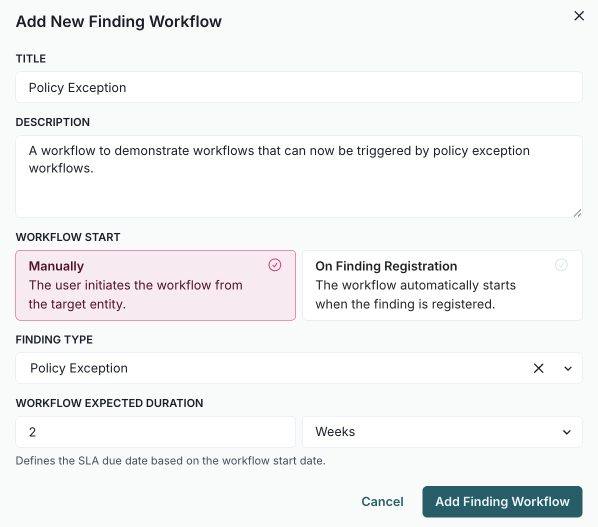
You can now use findings in workflows. Previously, you could already use workflows to transition your models into their appropriate next stages throughout their lifecycles. With this enhancement, you can now create similar workflows for findings that can be triggered manually or when a finding is created. For example, you might create a workflow that runs automatically when a policy exception finding is generated.
Expose finding type in formulas
With this update, you can now access finding type information in custom field formulas using the new finding_type parameter. This allows you to create dynamic calculations and conditional logic based on whether a finding is categorized as a "Validation Issue", "Policy Exception", or "Model Limitation".
Example uses:
- Calculate different risk scores based on finding type.
- Generate dynamic titles and descriptions.
- Set different due dates or priorities by finding category.
- Create type-specific business logic in formulas.
Simple dot notation:
finding_type.tag- Technical tag (e.g., "VALIDATION_ISSUE").finding_type.name- Human-readable name (e.g., "Validation Issue").
This feature is automatically available in all finding custom field formulas with no configuration required.
Example usage
Different calculations based on finding type:
if finding_type.tag == "VALIDATION_ISSUE":
    return severity_score * 2.5
elif finding_type.tag == "POLICY_EXCEPTION":
    return severity_score * 1.0
else:
    return severity_score * 1.8
Calculate due dates based on finding type:
base_days = 30
if finding_type.tag == "VALIDATION_ISSUE":
    urgency_multiplier = 0.5  # 15 days
elif finding_type.tag == "MODEL_LIMITATION":
    urgency_multiplier = 2.0  # 60 days
else:
    urgency_multiplier = 1.0  # 30 days

return base_days * urgency_multiplier
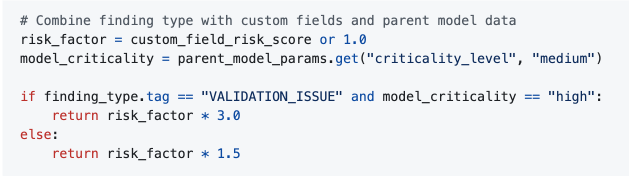
Combine finding type with custom fields and parent model data:
risk_factor = custom_field_risk_score or 1.0
model_criticality = parent_model_params.get("criticality_level", "medium")

if finding_type.tag == "VALIDATION_ISSUE" and model_criticality == "high":
    return risk_factor * 3.0
else:
    return risk_factor * 1.5
Add formula support for findings
This update allows you to use formula fields in findings to access custom field values from their parent inventory model using the params.model syntax. This enhancement enables more complex calculations by integrating both finding and model data.
Select columns when exporting findings
You can now export findings to CSV with the option to select specific columns, including custom fields. Custom fields are automatically filtered to show only those relevant to the chosen finding type.
Enhance CSV export for findings with custom fields
You can now export findings to CSV format, including all custom fields defined in your organization's finding schema, along with the standard finding information. Custom field values are formatted and labeled according to your schema configuration.
Add configurable registration fields
This update enhances the findings module with clearer field labels and an improved creation process.
- Clearer field labels: The finding interface now uses intuitive terms like "Creator" for the person who created the finding and "Assignee" for the person responsible for remediation.
- Enhanced finding creation: The finding creation form has been redesigned with a multi-step interface and now supports custom fields.
Allow skipping email notifications when creating findings or models
You can now opt to skip email notifications when creating findings or models using the public API by including the new optional parameter, skip_email_notification.