• Documentation
    • About ​ValidMind
    • Get Started
    • Guides
    • Support
    • Releases

    • ValidMind Library
    • Python API
    • Public REST API

    • Training Courses
  • Log In
  1. Add HTTP request workflow step
  • All releases

  • Current releases
  • Feature highlights
  • ValidMind Platform releases
  • ValidMind Library releases
  • Documentation updates

  • Breaking changes and deprecations

  • Release archive
  • 2025 Releases
    • April 24, 2025
    • March 7, 2025
    • January 31, 2025
  • 2024 Releases
    • December 24, 2024
    • December 6, 2024
    • October 22, 2024
    • September 25, 2024
    • September 9, 2024
    • August 13, 2024
    • July 22, 2024
    • June 10, 2024
    • May 22, 2024
    • March 27, 2024
    • February 14, 2024
    • January 26, 2024
    • January 18, 2024
  • 2023 Releases
    • December 13, 2023
    • November 9, 2023
    • October 25, 2023
    • September 27, 2023
    • August 15, 2023
    • July 24, 2023
    • June 22, 2023
    • May 30, 2023

Add HTTP request workflow step

frontend
25.11
enhancement
hidden
Published

November 1, 2025

You can now add outbound HTTP request steps within your workflow. This enhancement offers greater flexibility and control, enabling direct interaction with external services from the application.
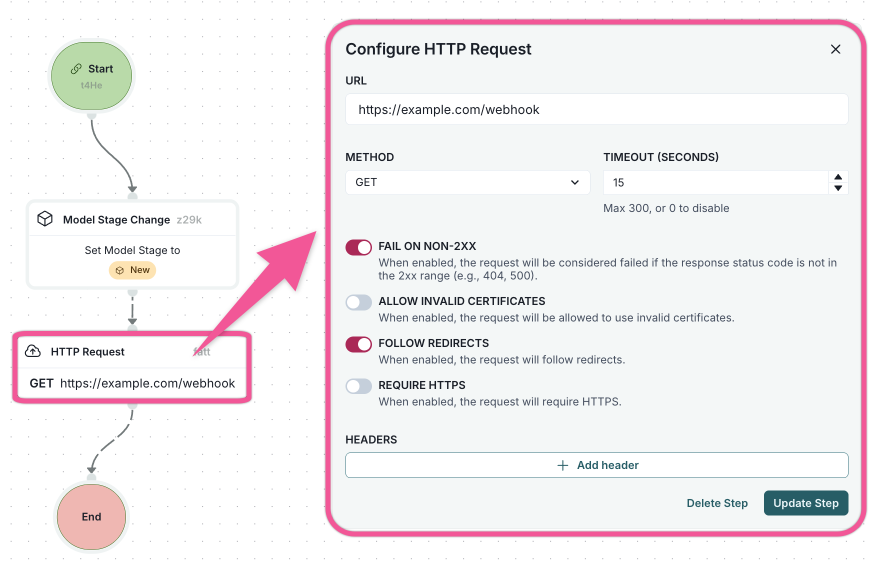
Setting up workflows

A workflow interface showing a flowchart on the left and a configuration panel on the right. The flowchart includes a Model Stage Change step connected to an HTTP Request step, which is then connected to an End step. The HTTP Request step is highlighted, and the configuration panel on the right is titled Configure HTTP Request. It includes fields for URL, METHOD with a dropdown set to POST, TIMEOUT (SECONDS) set to 15, BODY TYPE set to JSON, and a checkbox labeled FAIL ON NON-2XX. There is a Headers section with a text field labeled Test and a button labeled Add header, followed by a BODY section containing JSON code, and buttons labeled Delete Step and Update Step.

Configure HTTP Request panel
  • ValidMind Logo
    ©
    Copyright 2026 ValidMind Inc.
    All Rights Reserved.
    Cookie preferences
    Legal
  • Get started
    • Development
    • Validation
    • Setup & admin
  • Guides
    • Access
    • Configuration
    • Integrations
    • Workflows
    • Inventory
    • Documents & templates
    • Documentation
    • Validation
    • Reporting & auditing
    • Monitoring
    • Attestation
  • ValidMind Library
    • Quickstarts
    • Development tutorial
    • Validation tutorial
    • Run tests & test suites
    • Use library features
    • Code samples
    • Python API
    • Public REST API
  • Training
    • Learning paths
    • Courses
    • Videos
  • Support
    • Troubleshooting
    • FAQ
    • Get help
  • Edit this page
  • Report an issue
  • Community
    • GitHub
    • LinkedIn
    • Events
    • Blog