• Documentation
    • About ​ValidMind
    • Get Started
    • Guides
    • Support
    • Releases

    • ValidMind Library
    • Python API
    • Public REST API

    • Training Courses
  • Log In
  1. Model inventory: Field keys and configurable fields
  • All releases

  • Current releases
  • Feature highlights
  • ValidMind Platform releases
  • ValidMind Library releases
  • Documentation updates

  • Breaking changes and deprecations

  • Older releases
  • April 24, 2025
  • March 7, 2025
  • January 31, 2025
  • 2024 Releases
    • December 24, 2024
    • December 6, 2024
    • October 22, 2024
    • September 25, 2024
    • September 9, 2024
    • August 13, 2024
    • July 22, 2024
    • June 10, 2024
    • May 22, 2024
    • March 27, 2024
    • February 14, 2024
    • January 26, 2024
    • January 18, 2024
  • 2023 Releases
    • December 13, 2023
    • November 9, 2023
    • October 25, 2023
    • September 27, 2023
    • August 15, 2023
    • July 24, 2023
    • June 22, 2023
    • May 30, 2023

On this page

  • Update field keys in custom fields
  • Make core fields configurable for inventory models
  • Edit this page
  • Report an issue

Model inventory: Field keys and configurable fields

frontend
25.12
highlight
Published

December 10, 2025

Update field keys in custom fields

You can now view and rename the keys for custom fields directly from the custom fields settings page.

When you change a field’s name, you can also update its key. This keeps your custom field names and keys in sync, making it easier to manage calculated fields and maintain consistency.
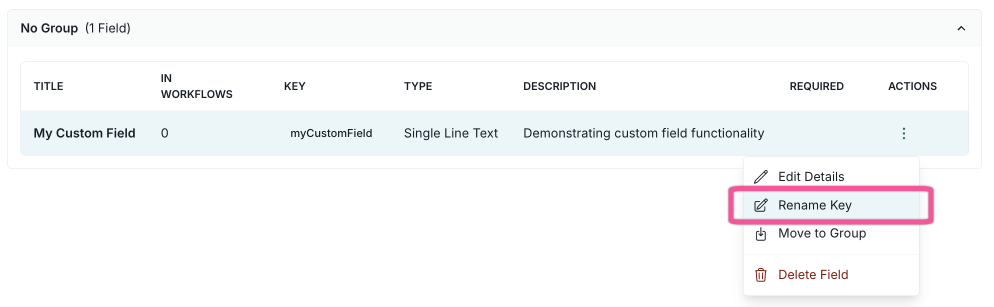
Add or edit inventory fields

A screenshot of the custom fields settings with the Rename Key action highlighted.

Rename custom field key

Make core fields configurable for inventory models

You can now configure core fields for inventory models, enabling greater flexibility and customization for model registrations and inventory overviews.

Core fields are the default fields that are always included when a model is created.
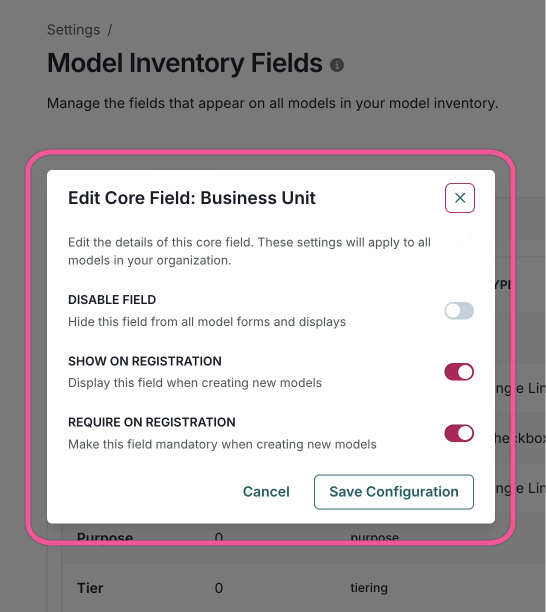
Manage model inventory fields

A screenshot of the Model Registration page with a customizable core field section. The section includes a dropdown menu for selecting the field type, a text input for the field name, and a checkbox for making the field required. The section also includes a button for adding a new field and a button for deleting the field.

A customizable core field
  • ValidMind Logo
    ©
    Copyright 2026 ValidMind Inc.
    All Rights Reserved.
    Cookie preferences
    Legal
  • Get started
    • Model development
    • Model validation
    • Setup & admin
  • Guides
    • Access
    • Configuration
    • Model inventory
    • Model documentation
    • Model validation
    • Workflows
    • Reporting
    • Monitoring
    • Attestation
  • Library
    • For developers
    • For validators
    • Code samples
    • Python API
    • Public REST API
  • Training
    • Learning paths
    • Courses
    • Videos
  • Support
    • Troubleshooting
    • FAQ
    • Get help
  • Community
    • GitHub
    • LinkedIn
    • Events
    • Blog
  • Edit this page
  • Report an issue