• Documentation
    • About ​ValidMind
    • Get Started
    • Guides
    • Support
    • Releases

    • ValidMind Library
    • Python API
    • Public REST API

    • Training Courses
  • Log In
  1. Add text support for custom test descriptions
  • All releases

  • Current releases
  • Feature highlights
  • ValidMind Platform releases
  • ValidMind Library releases
  • Documentation updates

  • Breaking changes and deprecations

  • Older releases
  • April 24, 2025
  • March 7, 2025
  • January 31, 2025
  • 2024 Releases
    • December 24, 2024
    • December 6, 2024
    • October 22, 2024
    • September 25, 2024
    • September 9, 2024
    • August 13, 2024
    • July 22, 2024
    • June 10, 2024
    • May 22, 2024
    • March 27, 2024
    • February 14, 2024
    • January 26, 2024
    • January 18, 2024
  • 2023 Releases
    • December 13, 2023
    • November 9, 2023
    • October 25, 2023
    • September 27, 2023
    • August 15, 2023
    • July 24, 2023
    • June 22, 2023
    • May 30, 2023

Add text support for custom test descriptions

validmind-library
2.8.20
documentation
enhancement
highlight
Published

April 16, 2025

We have enhanced the custom test framework, allowing you to define custom descriptions for your tests. If a test returns a string, it will be used as the test description, overriding the automatic description generation.

@vm.test("my_custom_tests.MyCustomTest")
def my_custom_test(dataset, model):
    """
    This is a custom test that does nothing.
    """
    y_true = dataset.y
    y_pred = dataset.y_pred(model)

    confusion_matrix = metrics.confusion_matrix(y_true, y_pred)

    cm_display = metrics.ConfusionMatrixDisplay(
        confusion_matrix=confusion_matrix, display_labels=[False, True]
    )
    cm_display.plot()

    plt.close()  # close the plot to avoid displaying it

    return cm_display.figure_, "Test Description - Confusion Matrix", pd.DataFrame({"Value": [1, 2, 3]})

Run test

from validmind.tests import run_test

result = run_test(
    "my_custom_tests.MyCustomTest",
    inputs={"model": "model", "dataset": "test_dataset"},
)

Output
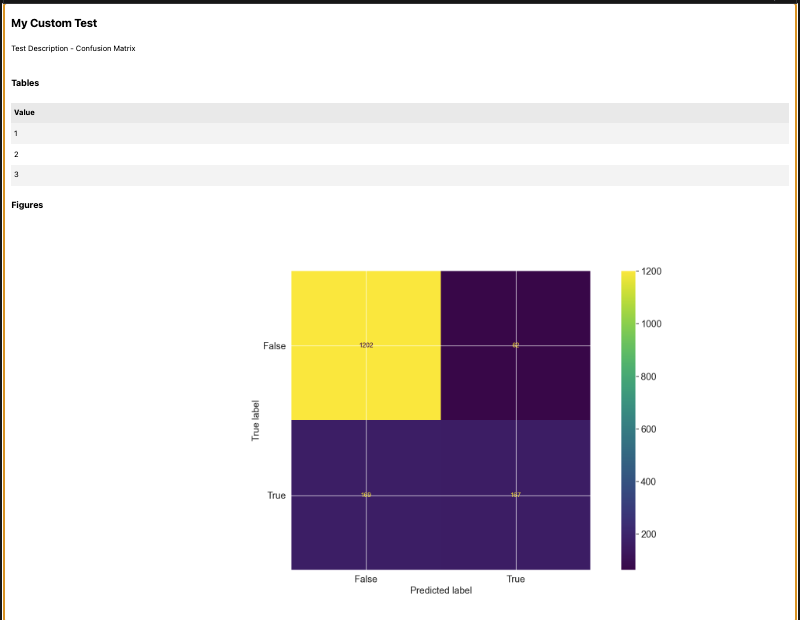
A web page titled My Custom Test displays a confusion matrix under the section labeled Test Description - Confusion Matrix. The page is divided into two main sections: Tables and Figures. The Tables section lists values 1, 2, and 3 in a vertical column. The Figures section contains a heatmap confusion matrix with a color gradient from yellow to dark purple, representing values from 0 to 1200. The matrix has axes labeled True label and Predicted label, with categories False and True on both axes.

Confusion matrix visualization
  • ValidMind Logo
    ©
    Copyright 2026 ValidMind Inc.
    All Rights Reserved.
    Cookie preferences
    Legal
  • Get started
    • Model development
    • Model validation
    • Setup & admin
  • Guides
    • Access
    • Configuration
    • Model inventory
    • Model documentation
    • Model validation
    • Workflows
    • Reporting
    • Monitoring
    • Attestation
  • Library
    • For developers
    • For validators
    • Code samples
    • Python API
    • Public REST API
  • Training
    • Learning paths
    • Courses
    • Videos
  • Support
    • Troubleshooting
    • FAQ
    • Get help
  • Community
    • GitHub
    • LinkedIn
    • Events
    • Blog
  • Edit this page
  • Report an issue